Product-Led Onboarding: How to Design Flows That Activate Users Fast
Guide users to their 'aha moment' fast by cutting friction, personalizing flows, and measuring activation to increase retention.
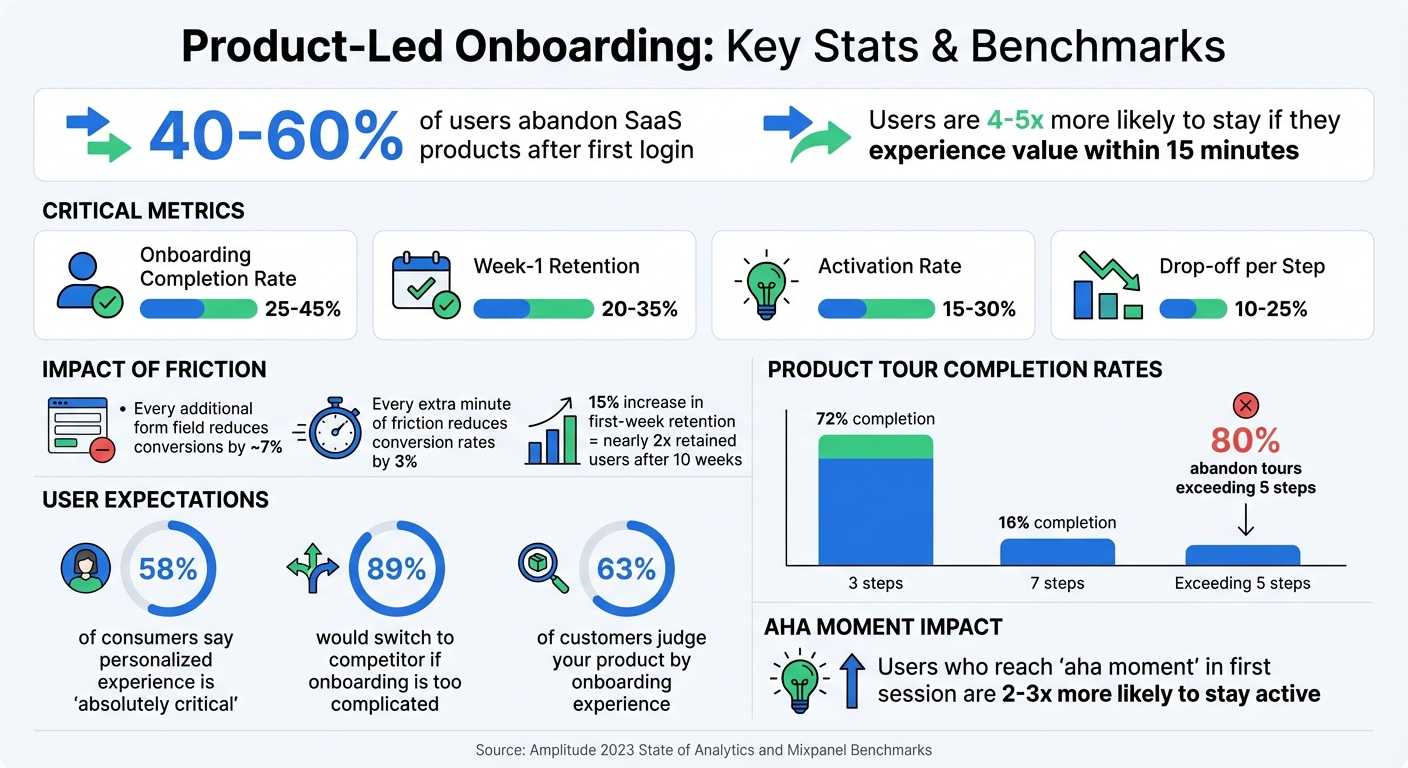
40–60% of users abandon SaaS products after their first login. Why? They don’t see the product's value quickly enough. Product-led onboarding solves this by using in-app guidance - like tooltips, checklists, and walkthroughs - to help users reach their "aha moment" faster. This approach boosts conversions, retention, and long-term growth without relying on sales calls or lengthy tutorials.
Key takeaways:
- Time-to-value matters: Users are 4–5x more likely to stick around if they experience value within 15 minutes.
- Reduce friction: Simplify steps like signup and email verification.
- Personalize onboarding: Tailor flows based on user goals or roles.
- Track key metrics: Activation rate, time-to-value, and completion rate are critical.
The goal? Guide users to success quickly and smoothly, turning first-time users into loyal customers.
The Ultimate Product-led Onboarding Playbook with Phil Vander Broek (Co-Founder and CPO at Dopt)
Map the User Journey to Find Activation Points
To create an effective onboarding experience, you first need to understand how users interact with your product and where they encounter obstacles. This involves carefully mapping out every step from signup to activation. Don’t overlook those small moments, like setup screens or information requests - these can often be where users face the most friction[9].
The ultimate goal is to pinpoint your product’s “aha moment” - that pivotal action where users first experience its core value. For instance, Slack users reach this moment when a team sends 2,000 messages[9], and Dropbox users experience it during their first file sync[7]. Your journey map should clearly outline the process from the initial signup to activation[10]. Along this path, focus on three key areas: the problems users aim to solve, the distractions or friction points that slow them down, and the benefits your product delivers[6].
Set Your Activation Metrics
Your activation metric needs to be specific and measurable. Vague goals like “used the product” won’t cut it. Instead, define a clear milestone - something like “created a project and assigned the first task” or “connected a data source and viewed the first dashboard”[9]. To identify this metric, analyze the behaviors of retained users during their first week and compare them to those who churned[9].
For example, collaboration tools might see activation when users send their first messages within minutes, while analytics platforms may take longer, requiring users to connect data and view insights[7]. The key is finding the action that shifts users’ perception, helping them see your product’s true value[14][4].
| Product Category | Example Activation Milestone | Target Time-to-Value |
|---|---|---|
| Collaboration | Sending first 5–10 messages within a team | Under 5 minutes |
| Project Management | Creating a project and assigning the first task | Under 15 minutes |
| Analytics | Connecting a data source and viewing the first dashboard | Under 1 hour |
| CRM | Adding contacts and logging the first activity | Under 24 hours |
| Design Tools | Selecting a template and creating the first design | Under 5 minutes |
Once your activation metrics are set, review each step of the process to identify and minimize friction.
Find Where Users Get Stuck
Understanding where users drop off before activation is crucial. Many users abandon the process before they fully experience your product’s value, making it essential to identify these sticking points. Funnel analysis can help track completion rates at each stage. For instance, if 80% of users complete Step 1 but only 30% move on to Step 2, you’ve found a trouble spot[13].
Tools like session replays and heatmaps can highlight areas where users hesitate or repeatedly struggle, revealing confusion or friction[13]. Conduct a friction audit of your onboarding process to eliminate unnecessary steps or fields that slow users down. Every additional form field, for example, can reduce conversions by roughly 7%[11]. Considering that the average onboarding completion rate for SaaS platforms is just 25%[13], streamlining the process is critical.
"If the biker is a user and the hill is a product or service, the job is to help get them to the top."
– Pulkit Agrawal, CEO and Co-founder, Chameleon [12]
Using the Motivation vs. Ability Framework can also help diagnose issues. If users are motivated but activation rates are low, your flow might be too complex and needs simplification. On the other hand, if the process is simple but activation is still low, you may need to better communicate your product’s value[9].
How to Design Onboarding Flows That Work
Once you've pinpointed where users face friction, the next step is to create onboarding flows that smoothly guide them toward activation. The goal? Get users to their "aha moment" as quickly and effortlessly as possible.
Focus on Core Actions
Everything in your onboarding flow should revolve around the actions that lead directly to your product's core value. Find that one "first win" action - whether it's creating a page in Notion, sending a message in Slack, or recording a video in Loom[15]. From there, strip away anything unnecessary. Aim for product tours that are short and to the point - ideally just 3–5 steps. Why? Tours with three steps see a 72% completion rate, while those with seven steps drop to a mere 16%[3][20].
Start with easy wins to build momentum. For example, use the "endowed progress effect" by marking simple tasks like "Account Created" as already done on a checklist. This psychological nudge makes users feel they’re already making progress, which increases the likelihood they’ll complete the process[20]. Also, streamline your signup process by offering Single Sign-On (SSO) and cutting out unnecessary form fields.
Add Guidance at the Right Time
Timing is everything when it comes to guiding users. Instead of bombarding them with a full product tour right away, introduce features gradually based on what they’re doing in the moment[15][18]. Use tooltips and in-app messages triggered by specific actions, ensuring the guidance feels relevant and helpful.
For example, Kommunicate revamped its onboarding in 2025 by switching to contextual tooltips that responded to user behavior rather than relying on static tours. This change boosted completion rates from 15% to 67% and increased feature adoption by 86%[18]. Similarly, Snappa eliminated the need for email activation during onboarding, making it easier for users to jump straight into the product[2].
"Tooltips are actually pretty hard to learn from! They're a fast, transient series of information tidbits that you have to memorize - that's a lot to ask of a new user."
– Lauryn Isford, Head of Product Growth, Notion[17]
Interactive guidance works better than passive instructions. Use checklists with progress bars to show users how far along they are[16][5]. Add resource centers or AI assistants so users can get help instantly without waiting for support[15][18]. And don’t underestimate the power of follow-up emails during the first 24–72 hours to re-engage users who might have stalled[17][3].
Give Users Early Wins
Starting with a blank slate can feel overwhelming. Instead, provide templates, pre-filled data, or sample projects to help users immediately interact with your product[17]. For instance, Loom simplifies the process by automatically copying the share link to the clipboard as soon as a recording ends, nudging users toward the next step of sharing their video[8].
Celebrate small victories along the way. Intercom boosted engagement during onboarding by adding fun animations like confetti when users completed key tasks[20]. Miro uses cheerful pop-ups - like a playful "Yeah!" - when users finish interactive steps like dragging or zooming on the canvas[18]. These small touches reinforce progress and keep users motivated.
"Learning how to use a new product is exhausting! Set your users up for success by ensuring that setup is an exchange of value - every time they work hard to give you information... reflect that hard work immediately back to them."
– Lauryn Isford, Head of Product Growth, Notion[17]
Fast-track the process by offering import options. Let users bring in existing work from tools like Google, Slack, or Notion, or upload data from CSV files[8]. The quicker users see their own data in your product, the faster they’ll understand its value. Keep in mind that 63% of customers judge your onboarding experience when deciding whether to subscribe[18][19], and improving retention by just 15% in the first week can nearly double the number of users who stick around after 10 weeks[3].
Personalize Onboarding for Different Users
When users sign up, they bring unique goals to the table. A marketing manager aiming to automate email campaigns isn’t looking for the same features as a sales rep tracking leads. If you treat all users the same, you risk overwhelming them with irrelevant options, slowing their path to value.
Personalization isn’t optional anymore - it’s a must. 58% of consumers say a personalized experience is "absolutely critical"[1], and 89% would consider switching to a competitor if onboarding feels too complicated[1]. Even basic segmentation based on user goals or roles can significantly boost activation rates by creating tailored experiences that guide users more efficiently.
Group Users by Their Goals
One of the quickest ways to personalize onboarding is by asking users about their objectives and delivering exactly what they need. A simple goal-selection screen after signup can make a huge difference. When users pick their primary goal or role, you can trigger a customized flow that eliminates distractions and focuses on what’s relevant.
For example, in May 2023, ActiveCampaign introduced a goal-based onboarding survey. Users were asked if their main focus was "Email Campaigns" or "Automation." Based on their choice, the platform provided a tailored checklist. "Automation" users were guided to templates to learn the builder, while "Email" users were directed to launch a campaign[21][22]. This simple split ensured users only interacted with features they needed.
Similarly, Miro asks users to select use cases like "Strategy & Planning" during signup. Based on their choice, the platform customizes the interface with relevant templates and features, skipping over unnecessary tools[24]. Another option is to use short open-ended surveys like, "Why did you sign up today?" to capture user-specific language and pain points, then group them accordingly.
| Grouping Method | How to Identify | Custom Onboarding |
|---|---|---|
| By Goal | Signup survey (JTBD) | Tailored checklists and templates |
| By Role | Role selection (Admin/User) | Permission-specific guides and docs |
| By Intent | Search/source URL | Direct entry into specific feature |
Guide Users to Their Aha Moment
Once users are grouped, the next step is guiding each segment to their "aha moment" - that key realization when they see the value of your product. Users who experience their aha moment in the first session are 2-3x more likely to stay active[7]. For Slack, it’s sending the first message. For Notion, it’s creating the first page. For Shopify, it’s adding the first product[15][7].
In July 2023, Canva sped up time-to-value by creating dedicated landing pages for specific intents, like "how to create a poster." Users clicking the CTA were taken directly to a poster-editing interface with preloaded templates, cutting onboarding time in half[23]. This approach eliminates guesswork, making it easy for users to dive in and succeed quickly.
To replicate this, work backward from success. Analyze your top customers’ behavior to pinpoint the actions that led to their aha moment, then guide new users toward those same steps[3]. Use interactive walkthroughs that require users to perform a core task instead of passively watching a demo[15]. And keep this in mind: achieving a time-to-value under 15 minutes can lead to 4-5x higher Day 7 retention[7].
"Your job with user onboarding is not to convince, but to connect with prospects. Deliver value, share the win for the customer, then bring them home for the sale."
– Val Geisler, Founder, FixMyChurn.com[22]
Measure and Improve Your Onboarding
Creating an onboarding flow is just the start - tracking how users interact with it tells you what’s working and what needs fixing. Even small tweaks can make a huge difference in retention and revenue.
Monitor the Right Metrics
Focus on metrics that show whether users are finding value in your product. The activation rate is key - it measures the percentage of users who hit a milestone that signals they've experienced your product’s core value. For example, this might be sending a first message in Slack or adding a product in Shopify [25][4][26]. Another important metric is time to value (TTV), which tracks how long it takes for users to reach that "aha" moment. Reducing TTV - ideally to under 15 minutes - can significantly improve Day 7 retention [7]. Lastly, keep an eye on your onboarding completion rate, which reflects how many users finish the onboarding process. For SaaS platforms, the average completion rate hovers around 25% [13]. Improving this even slightly can signal big gains in usability.
| Metric | SaaS Benchmark |
|---|---|
| Onboarding Completion Rate | 25–45% |
| Week-1 Retention | 20–35% |
| Activation Rate | 15–30% |
| Drop-off per Step | 10–25% |
Source: Amplitude 2023 State of Analytics and Mixpanel Benchmarks [13]
These metrics help you identify where to make adjustments, speeding up user activation and supporting a product-led onboarding approach. Once you’ve defined your metrics, use experiments to fine-tune your process.
Test and Refine Your Approach
Pinpoint where users drop off, then run targeted experiments to smooth out friction. Funnel mapping can help you document every step from signup to the "aha" moment, making it easier to see where users are abandoning the process [27][9][4]. Prioritize A/B testing on areas with the highest drop-off rates, like email verification or overly complex integration steps [13][4].
For example, Heap shifted from time-based emails to behavior-triggered sequences in December 2020. These emails were sent based on specific user actions, such as "installed snippet but not yet defined an event." After syncing behavioral data with Marketo, Heap saw a 10% improvement in users progressing from signup to the "share a report" milestone [27].
Similarly, between February and May 2024, Supademo revamped its onboarding by introducing reverse trials and a semi-mandatory first recording step. Under CEO Joseph Lee’s leadership, these changes increased onboarding completion rates by nearly 10% (reaching over 80%) and boosted activation rates by 20%. TTV also dropped by 39%, falling to less than five hours [28].
These examples highlight the impact of removing unnecessary steps and tailoring the experience to user behavior.
Case Study: Cutting Sign-Up Steps to Boost Activation
Here’s a real-world example of how simplifying onboarding can drive results. At Meta, the product team removed six fields from the signup form and eliminated a 12-step guided tour. Instead, they dropped users directly into the core workflow with a pre-seeded prompt. This reduced the median TTV from 100 seconds to just 14 seconds and cut day-one churn from 41% to 32%, retaining around 700,000 more active users [29]. Notably, nearly 80% of users abandon product tours that exceed five steps [29].
The takeaway? Look critically at your onboarding process and cut or delay any steps - like profile setup or team invites - that don’t immediately guide users to their first "aha" moment [7][9]. Tools like session replays and heatmaps can reveal where users hesitate or struggle, offering insights that raw data might miss [7][13][9]. Use frameworks like RICE (Reach, Impact, Confidence, Effort) to prioritize which changes to test first [13].
Conclusion: Build Onboarding That Drives Growth
Effective onboarding isn’t about overwhelming users with every feature - it’s about helping them achieve their first success quickly. When users experience value during their first session, they’re 2-3x more likely to convert [7]. Those initial moments within your product often determine whether a user stays or churns.
The key to better activation lies in understanding your users’ goals and eliminating anything that slows them down. Every extra minute of friction reduces conversion rates by 3% [11]. This highlights why every design choice should prioritize making success as easy and fast as possible.
"Onboarding is where you win or lose the customer. Get it right, and everything else gets easier." - Rework Resources [7]
What sets great onboarding apart is data-driven iteration. Keep an eye on metrics like activation rate, time to value, and completion rate. Use this data to identify where users drop off and focus experiments on improving those steps. Even small wins add up - a 15% increase in first-week retention can nearly double your retained users after 10 weeks [3].
Ultimately, onboarding is an ongoing process. When users reach their "aha moment" quickly, they don’t just convert - they stick around, grow with your product, and become loyal advocates. By continuously refining your onboarding process, you can drive consistent SaaS growth and build lasting customer relationships.
FAQs
How do I pick the right activation metric for my product?
To determine the right activation metric, pinpoint the specific action or milestone that proves users are connecting with your product's main value. This might involve completing a setup process, using a standout feature, or reaching an outcome that signals genuine engagement. Choose metrics that are easy to track, actionable, and directly linked to behaviors that drive long-term success. Balancing early engagement indicators with retention-focused metrics will give you a more complete picture of user activity.
What’s the fastest way to cut onboarding friction without hurting data quality?
The fastest way to make onboarding easier while keeping data quality intact is to cut out unnecessary steps, direct users toward a single key action, and offer simple, in-the-moment support. Instead of relying on long tours or complicated help centers, use inline hints, progress indicators, or tooltips to create a smooth and user-friendly experience.
How can I personalize onboarding with minimal engineering effort?
You can tailor the onboarding experience with minimal engineering effort by leveraging AI-powered tools and pre-built templates. These resources allow for quick adjustments to match user roles, objectives, or where they are in their journey. Features such as dynamic checklists and context-aware flows automatically adapt to user behavior, cutting down on the need for manual tweaks. This streamlined approach not only minimizes engineering work but also helps users find value early in their experience.
Related reading
- Why We Avoid Feature Bloat
- How 8 SaaS Companies Reduced Churn by Fixing Their First-Run Experience
- SaaS Onboarding Teardowns: 9 Sign-Up Flows That Convert Above 15%
- From 2% to 8% Trial Conversion: What Changed at 5 SaaS Companies
- How to Use Discounts Without Hurting Revenue
Useful tools & services
Find the obstacle before adding more onboarding
Review the path to first value and agree which changes your team should implement.
Explore onboarding optimizationNeed help choosing the next change? Explore CRO consulting.
Keep improving your conversion work.
Subscribe for practical ideas on diagnosing conversion problems, planning experiments, and choosing your next improvement.
No spam. Unsubscribe anytime.