On-Page SEO Basics for SaaS Websites
Intent-driven on-page SEO for SaaS: map keywords to buyer stages, optimize meta tags, headers, internal links, content, and schema.
On-page SEO is essential for SaaS websites to improve search visibility, attract qualified leads, and drive demo signups. Here's what you need to know:
- Why It Matters: 68% of online experiences start with search engines, making SEO a key lead generation tool for SaaS companies.
- Key Components: Optimize meta tags, headers, internal links, and content to match user intent and improve rankings.
- Keyword Research: Focus on intent-based keywords (informational, navigational, commercial, transactional) aligned with the buyer's journey.
- Content Optimization: Tailor content for awareness, consideration, and decision stages to maximize conversions.
- Technical SEO: Ensure fast load times, mobile-first design, and clean URL structures.
- Schema Markup: Use structured data like FAQ and SoftwareApplication schema to enhance search visibility and AI-driven results.
Ultimate SaaS SEO Strategy For 2025
Keyword Research for SaaS Websites
SaaS keyword research focuses on understanding the phrases your potential customers use when evaluating tools, comparing options, or solving specific challenges. As Ken Marshall puts it:
"Proper SaaS keyword research is the foundation of every successful SaaS SEO strategy. Without it, you're completely flying blind with the rest of your SEO and content efforts." [5]
To get the most out of your keyword research, start by organizing keywords based on intent. These typically fall into four main categories:
- Informational: Users searching for solutions or learning about a topic.
- Navigational: Searches aimed at finding specific features or tools.
- Commercial: Queries comparing products or services.
- Transactional: Phrases from users ready to make a purchase.
Next, align these keyword categories with the buyer's journey - awareness, consideration, and decision stages [5][6]. This ensures your content addresses user needs at every step.
Don’t disregard low-volume keywords. For instance, a comparison page targeting "your product vs competitor" with just 200 monthly searches could outperform a high-volume guide. Why? With a 15% conversion rate, it can deliver more value than a 5,000-search guide converting at only 1% [6]. In fact, bottom-of-funnel keywords like "alternatives", "vs", and "pricing" often drive 40% to 60% of SaaS organic conversions, even with lower search volumes [6].
Understanding User Intent in SaaS
SaaS buyers typically spend weeks - or even months - researching before committing to a product subscription [6]. That’s why understanding user intent is so important. The same keyword can mean different things depending on context. For example, someone searching for "best email marketing tool" is likely looking for a neutral comparison rather than a product's homepage [3].
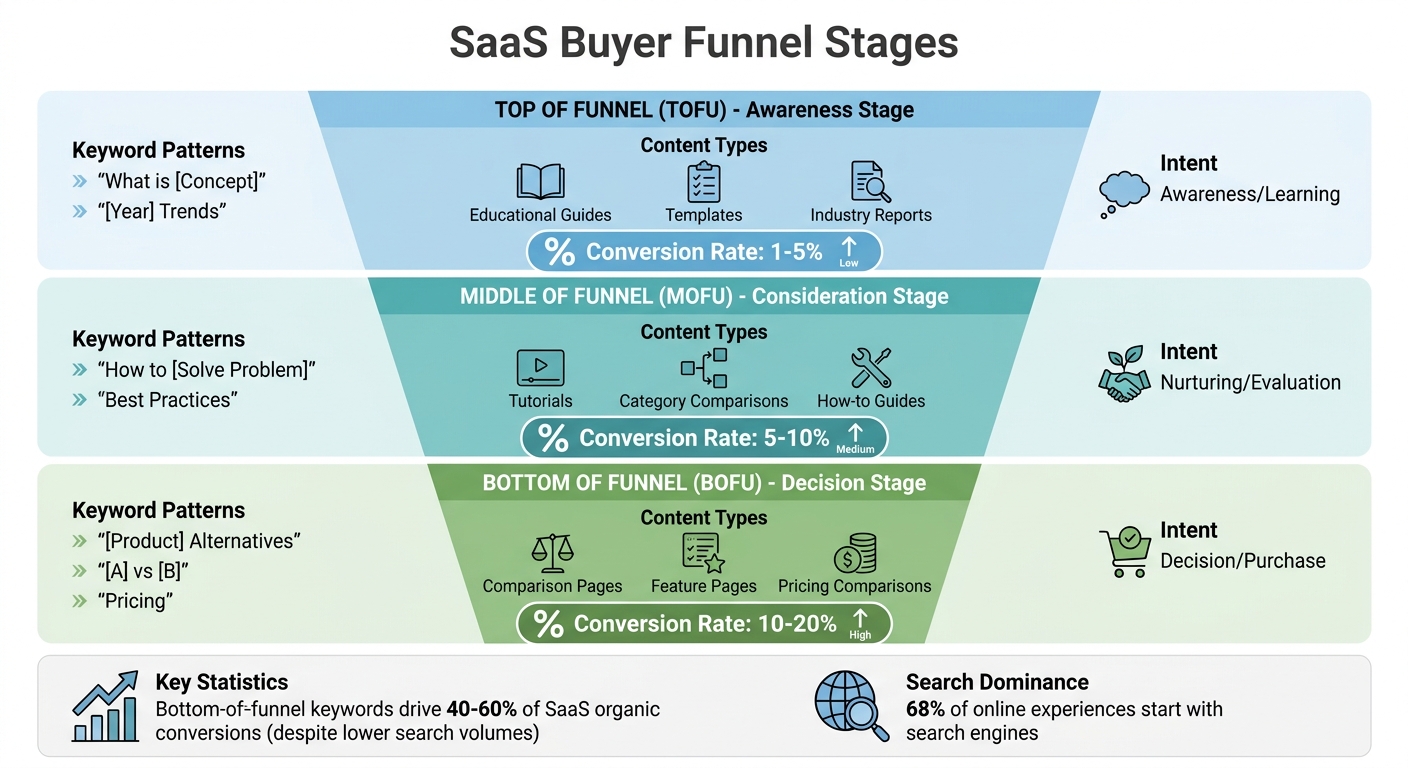
Conversion rates also vary by stage in the funnel. Bottom-of-funnel keywords tend to convert at 10% to 20%, middle-of-funnel at 5% to 10%, and top-of-funnel informational terms at just 1% to 5% [6]. To pinpoint the language your audience uses, talk to your sales and customer success teams. They can share common questions from onboarding or sales calls. Then, analyze competitors - both direct and indirect - to identify content gaps and keyword opportunities [5].
Refine your keyword strategy by adding intent-focused modifiers. For example:
- Use "how" or "examples" for informational searches.
- Add "review" or "comparison" for commercial queries.
- Include terms like "pricing" or "demo" for transactional searches [5].
Finding Long-Tail Keywords for SaaS
When building your keyword strategy, long-tail keywords are invaluable. These are highly specific phrases that often align closely with niche audience needs. For example, instead of targeting "project management software", you could focus on "project management for remote teams", which has a stronger chance of converting [7].
Competitor keyword gap analysis is a great way to uncover these opportunities. Use tools to find keywords where competitors rank in the top 10 but your site doesn’t. Focus on terms with low Keyword Difficulty (KD) - aiming for scores under 20 for easier wins [6]. Apply intent filters to discover long-tail variations that show users actively exploring solutions or comparing products.
Another useful tactic is mining SERP features like Google’s "People Also Ask" and "Related Searches." These sections often highlight natural language questions, such as "how to reduce churn", which can convert better than generic terms [3].
Assign keyword clusters to specific page types. For example:
- Use case pages: Target long-tail commercial keywords like "project management for remote teams."
- Feature pages: Focus on navigational terms like "task automation tool" [5][6].
Building topical clusters can further boost your authority. Create a pillar page that covers a broad topic comprehensively, then link it to multiple related articles. This approach signals to search engines that your site is a trusted resource [6].
Finally, when starting out, target keywords with a low KD (under 49) to build momentum. Regularly audit your site to ensure you’re not competing with yourself - multiple pages targeting the same long-tail keyword can hurt your rankings [5][6].
Optimizing Meta Tags and Headers
Meta tags and headers are your first chance to grab attention in search results. They don’t just help with rankings - they can also drive demo signups and bring in inbound leads. Think of meta descriptions as your ad copy, persuading users to click on your result over others.
As Admin Inbound from Inbound Junction explains:
"Your page title is worth as much as all the content on your page. If it doesn't convince readers to click, nothing else on your page matters." [3]
Your title tag should make it immediately clear what your software offers, not just highlight your brand. Search engines rely on these elements to gauge your page's relevance, while users decide if your content matches their needs.
Let’s break down how to fine-tune title tags, meta descriptions, and headers.
Writing Effective Title Tags
Aim for title tags between 60–65 characters. This keeps them concise and focused. For instance, instead of writing "ProjectFlow - The Best Software for Your Business", try: "Project Management Software for Remote Teams | ProjectFlow." The second version is clear, specific, and tells users exactly what you offer.
Make sure your title tag aligns with your H1 to send consistent relevancy signals. While Google is smart enough to understand synonyms and intent, using keywords naturally still helps. Tailor your title strategy based on the page type. For example:
- Product pages: Highlight the core product or solution.
- Feature pages: Focus on specific capabilities.
- Blog posts: Emphasize the topic or key takeaway.
Creating Meta Descriptions That Get Clicks
Meta descriptions play a big role in improving click-through rates, which Google considers a quality signal [8] [9]. Write them like short, compelling ads, keeping them between 120–156 characters to avoid getting cut off.
Use action-oriented language with a clear call to action, such as "Try for free", "Learn more", or "Get started today." SaaS buyers are often comparing tools or solving specific challenges, so your description should speak directly to their needs. For example, a meta description for project management software might read:
"Streamline remote team collaboration with automated task management. Try ProjectFlow free for 14 days - no credit card required."
Make sure to naturally include your focus keyword and write unique descriptions for your most important pages. For technical SaaS products, adding details like pricing or key features can help attract users searching for specific solutions.
This leads us to the importance of headers in creating a user-friendly and search engine-friendly structure.
Structuring Headers for Easy Reading
Headers create a logical structure that benefits both users and search engines. Use an H1 for the main topic, H2 for key sections, and H3 for supporting details.
To craft effective subheadings, consider using Google’s "People Also Ask" section to identify common questions. For example, if you’re writing about project management software, questions like "How does task automation work?" or "What integrations are available?" could serve as H2 or H3 headings.
Clear header breaks improve readability, especially on mobile devices. Well-organized headers can also increase your chances of landing a featured snippet, which accounts for roughly 8% of search result clicks [3].
Internal Linking and URL Structure
Building on the earlier discussion of meta tags and headers, internal linking plays a key role in strengthening your site's SEO strategy. Think of internal links as the connective tissue of your SaaS website - they help search engines understand the relationship between your pages while guiding users toward critical actions like demo requests or pricing details. As John Mueller, Search Advocate at Google, explains:
"It's one of the biggest things that you can do on a website to kind of guide Google and guide visitors to the pages that you think are important." [11]
A well-structured internal linking system ensures your site is easy to navigate and crawl. Ideally, no important page should be more than three clicks away from your homepage [3]. This shallow structure not only speeds up indexing by search engines but also improves user experience. Internal links also allow you to pass authority from established pages to newer ones, helping fresh content gain traction in search rankings. Once internal links are in place, the next focus should be crafting SEO-friendly URLs to boost discoverability even further.
Building a Logical Internal Linking System
To create a strong internal linking structure, start by organizing your content into clusters. For example, if you have a pillar page about "email marketing automation", link it to a set of 10–30 related articles. Each supporting article should also link back to the pillar page, forming a hub-and-spoke model that signals expertise to search engines.
When adding links, use descriptive anchor text instead of generic phrases like "click here" or "learn more." For instance, if you're linking to a guide on API integrations, opt for anchor text like "API integration best practices." This approach provides clear context for both users and search engines.
Additionally, hub pages can serve as central points, connecting tutorials, case studies, and other resources. Within blog posts, aim to include 3–5 contextual links in the body text to enhance semantic relevance and user engagement. This systematic linking naturally leads to the importance of having clean, keyword-focused URLs.
Creating SEO-Friendly URLs
Short, readable URLs that include relevant keywords are essential for both users and search engines. For example, a URL like yoursite.com/project-management-software is far more effective than a long, parameter-filled string. Clean URLs are easier to remember, share, and interpret, which helps boost their overall effectiveness.
Here are a few best practices for creating SEO-friendly URLs:
- Use lowercase letters and separate words with hyphens. Avoid underscores, spaces, or special characters.
- Remove unnecessary "stop words" like "and", "the", or "of", unless they are essential for clarity.
- Keep URLs concise - two or three words are ideal.
For SaaS websites, it's also important to separate your marketing site from your app. Use a robots.txt file to block search engines from crawling app-specific routes like /app/ or /dashboard/. This prevents index bloat and ensures search engines focus on pages that drive conversions, like landing pages or blog posts.
A great example of this strategy in action comes from Zapier. By 2026, their programmatic SEO efforts, combined with a consistent URL structure, contributed to 40% of their 3 million monthly organic visits [6]. The takeaway? A logical, scalable URL structure paired with strategic internal linking can lead to significant organic growth.
Optimizing Content and Media
To get the best results, you need to optimize your content and media for both search engines and users. This involves crafting content that aligns with each stage of the buyer's journey while ensuring your pages are fast, mobile-friendly, and easy to navigate.
Writing Content for Different Buyer Stages
SaaS buyers typically go through three stages: awareness, consideration, and decision. Your content should address their needs at each step.
-
Awareness Stage: At this point, buyers are just starting to explore solutions. Focus on broad, educational content like "What is project management software?" or reports on industry trends. These types of pages help build brand visibility and strengthen your authority in the field.
-
Consideration Stage: Here, users are evaluating their options and need actionable insights. Create "how-to" guides, best practices articles, and comparison pieces that help them make informed decisions. This type of content builds trust and encourages engagement.
-
Decision Stage: Now, buyers are ready to choose. Content like "[Product] alternatives", "[Product A] vs [Product B]", and pricing comparisons can drive conversions. While top-of-funnel content might convert at rates of 2% to 5%, bottom-of-funnel pages often achieve much higher conversion rates - 10% to 20% [6]. As Shane O'Hare from Common Ground explains:
"On-page SEO is more than keywords. Your on-page content affects visibility, UX, and lead quality, especially when it comes to high-intent, bottom-of-the-funnel pages" [4].
Here’s a quick breakdown of the funnel stages, keyword patterns, and content types:
| Funnel Stage | Keyword Patterns | Content Types | Intent |
|---|---|---|---|
| TOFU | What is [Concept], [Year] Trends | Educational Guides, Templates | Awareness/Learning |
| MOFU | How to [Solve Problem], Best Practices | Tutorials, Category Comparisons | Nurturing/Evaluation |
| BOFU | [Product] Alternatives, [A] vs [B], Pricing | Comparison Pages, Feature Pages | Decision/Purchase |
Optimizing Images and Alt Text
Images often make up more than 75% of a website’s total page weight, so optimizing them is crucial for fast load times [12]. Start by using descriptive filenames with hyphens (e.g., saas-dashboard-analytics.webp instead of IMG_1234.jpg) [13][14].
Alt text is another key factor. Write concise descriptions under 125 characters to help search engines and screen readers understand the image. Avoid phrases like "image of" or "photo of" - instead, describe the image directly. For example, use something like "project management dashboard showing task completion rates" instead of a generic description.
To reduce file sizes without losing quality, switch to modern formats like WebP or AVIF. These formats offer better compression than JPEG or PNG, helping you keep individual images under 100KB [13][14]. This is important because Google Images accounts for 22.6% of all internet searches, and Google Lens processes 12 billion searches monthly [13][15]. Well-optimized images can drive significant traffic to your site.
Once your images are optimized, make sure your website is fully prepared for mobile users.
Designing for Mobile-First
Google now uses mobile-first indexing, meaning it primarily evaluates your mobile site - not the desktop version - for rankings [4][16]. Poor mobile performance can hurt both your rankings and conversion rates, as visitors typically won’t wait more than 3 seconds for a page to load [3].
To meet Google’s Core Web Vitals standards for mobile, aim for the following:
- Largest Contentful Paint (LCP): Under 1.5 seconds
- Interaction to Next Paint (INP): Under 200ms
- Cumulative Layout Shift (CLS): Under 0.1 [6]
You can improve mobile performance by compressing images with WebP or AVIF, enabling lazy loading for below-the-fold content, and writing short, scannable paragraphs. If your SaaS site uses frameworks like React or Next.js, opt for Server-Side Rendering (SSR) or Static Site Generation (SSG) instead of client-side rendering to enhance speed and crawlability [6]. Sites that excel in mobile optimization often see click-through rate improvements of 20% to 30% [6].
Using Schema Markup for SaaS
Once you've established strong on-page SEO, schema markup can take things further by making your pages easier for search engines to interpret. It highlights key details like the problems your software solves, its category, and the context of your content [1]. This structured data enables rich snippets - such as star ratings, pricing information, and FAQ dropdowns - that make your listing stand out [3][4]. Schema also plays a role in Generative Engine Optimization (GEO), helping your content appear in AI-powered tools like ChatGPT and Google AI Overviews [4][10].
Benefits of Schema for SaaS Websites
Rich snippets not only grab attention but also occupy more space in search results, giving your listing an edge over plain text entries [3]. Featured snippets, often supported by structured data, account for around 8% of clicks in search results [3]. Additionally, schema can help Google index your pages faster [3]. Data shows that 76% of sources cited in Google AI Overviews rank within the top 10 traditional search results, and sites with strong Answer Engine Optimization strategies attract 3.4 times more AI-driven search traffic compared to others [10]. Shane O'Hare from Common Ground explains:
"Implementing schema on your webpages can help your content surface more visibly in both Google Search and LLMs like ChatGPT or SGE-powered search, making schema an important step in preparing your content for Generative Engine Optimization (GEO)." [4]
Which Schema Types to Use
Different schema types serve specific purposes across your SaaS website. Here's how you can use them effectively:
- FAQ Schema: Ideal for support and feature pages, this schema enhances your SERP presence by adding clickable questions that address common user concerns [3][4].
- SoftwareApplication Schema: Best for core product pages, it showcases ratings, pricing, and software categories [4][1].
- Article Schema: Perfect for blog posts and educational content, it helps search engines and AI tools categorize and reference your expertise [4][1].
- HowTo Schema: Use this on tutorials and integration guides to capture step-by-step featured snippets [4].
- Review or Rating Schema: Apply this schema to testimonial pages to display star ratings, which can build trust and improve click-through rates [3][4].
To implement schema, use JSON-LD, a simple and maintainable format [17]. Start by identifying high-impact pages like product, FAQ, and guide pages. Generate the JSON-LD code, insert it into your page's HTML, and validate it with Google's Rich Results Test [17]. For larger SaaS websites, automation tools or WordPress plugins like Yoast or SEOPress can simplify managing schema across multiple pages [17][3]. Once implemented, monitor performance using Google Search Console to ensure proper indexing and address any errors [4][17]. Integrating schema with your broader SEO strategy can significantly improve visibility and engagement.
| Schema Type | SaaS Application | Search Visibility Benefit |
|---|---|---|
| FAQ | Support pages, feature pages | Expands SERP real estate with clickable questions [3][4] |
| SoftwareApplication | Core product landing pages | Displays ratings, pricing, and software category [4][1] |
| Article | Blog posts, industry news | Improves categorization for search and AI citations [4][1] |
| HowTo | Tutorials, integration guides | Captures step-by-step featured snippets [4] |
| Review / Rating | Product and testimonial pages | Displays star ratings to build trust and boost CTR [3][4] |
Conclusion
On-Page SEO Basics Recap
On-page SEO transforms your SaaS site into a search-friendly powerhouse [1]. It all starts with intent-based keyword mapping - matching keywords to specific buyer journey stages to avoid internal competition and keyword cannibalization [1][2]. A well-structured site is equally important. Core product pages should target high-intent searches, while feature and use-case pages highlight specific capabilities. Supporting content clusters can dive into educational topics, creating a well-rounded content strategy [1].
Don't overlook the technical essentials: fast load times, mobile-first design, and secure URLs are non-negotiable [1][2]. Use strategic internal linking to connect educational blog posts with product and feature pages, guiding users through a logical discovery path while spreading authority across your site [1][7]. Meta tags should clearly define your software category rather than focusing solely on your brand name. Additionally, a clear header hierarchy - H1 for main topics, H2 for key features, and H3 for finer details - helps both users and search engines navigate technical content effectively [1].
Schema markup is another powerful tool to boost visibility. Implementing types like SoftwareApplication, FAQ, and Article schema can help your content stand out in rich snippets and AI-driven search environments, setting you up for the evolving landscape of Generative Engine Optimization [1][4]. As Shane O'Hare, Client Partner at Common Ground, aptly states:
"On-page SEO is one of the most controllable and often underused tools that B2B SaaS and tech teams have when it comes to improving their digital performance" [4].
By focusing on these tried-and-true strategies, you can lay a solid foundation for immediate improvements while paving the way for sustained organic growth.
Next Steps for SaaS SEO
Begin with a comprehensive audit to identify quick wins. Use tools like Google Search Console to pinpoint pages with high impressions but low click-through rates - these are perfect candidates for updating title tags and meta descriptions [1]. Also, check for keyword cannibalization and ensure no critical page is buried more than three clicks deep from your homepage [1][3].
Keep in mind that on-page SEO isn’t a one-and-done task. Conduct quarterly audits to catch issues like broken links or page speed problems early [1][4]. Refresh high-performing blog posts with updated data, examples, and internal links to maintain topical authority in the ever-changing SaaS landscape [1][3]. Use tools like Google Search Console to monitor your site’s technical health, keeping an eye on issues like indexation errors and mobile usability as your site grows [1][4]. Consistent on-page SEO efforts can drive meaningful, long-term growth [4].
FAQs
Which pages should I optimize first on a SaaS site?
When improving your website, focus first on pages that have the biggest impact on visibility and conversions. This means starting with your homepage, core product pages, and landing pages for specific features or solutions. These pages are often the primary entry points for both visitors and search engines, making them critical to your site's performance.
After addressing these, shift your attention to high-traffic blog posts or resource pages. Optimizing these can help increase your authority and draw in more organic traffic. To maximize the results, use internal linking to connect these pages effectively and emphasize your most important content.
How can I avoid keyword cannibalization between feature and blog pages?
To keep keyword cannibalization at bay, start by assigning specific keywords and search intents to each page. This requires careful keyword research to ensure no overlap.
Next, focus on internal linking. A well-optimized internal linking structure helps search engines understand your site's hierarchy and the relevance of each page.
Don’t forget to create unique meta tags and headers for every page. This helps differentiate your content and ensures each page has a distinct purpose.
Lastly, make it a habit to audit your site regularly. Look for overlapping content, and when you find it, either adjust the keywords or consolidate pages. This keeps your site organized and ensures every page has a clear focus, which can significantly boost your SEO performance.
Which schema markup should a SaaS website implement first?
Adding schema markup to your SaaS website is a smart move. It helps search engines better understand your content, which can directly affect how your site appears in search results.
With schema markup, you can highlight key details like product features, pricing, reviews, and FAQs. This makes your website more visible and attractive to potential customers when they search for solutions online. By making your content easier to interpret, you increase the chances of standing out in crowded search results.
Related reading
- Common Mistakes in Measuring Growth Advisory ROI
- Low-Competition Keywords for SaaS: How to Find High-Intent Gaps
- B2B SaaS Pricing Page Analysis: What 200 Top Companies Get Right and Wrong
- ADHD Task Paralysis: Why You Can't Start & What Actually Helps
- How to Decide What to Work on When Everything Feels Urgent
Useful tools & services
Turn the idea into a growth decision
Define the audience, constraint, owner, and success check in a practical plan.
Use the growth strategy templateNeed help choosing the next change? Explore CRO consulting.
More of the right people
New articles on this, by email.