The Self-Serve to Sales-Assist Transition: When Product-Led Growth Needs a Human
Blend self-serve with sales-assist to convert high-value accounts: detect PQLs, gate enterprise features, and route leads.
Is your product-led growth model stuck? Here’s why: self-serve systems often hit a ceiling when larger, complex accounts come into play. These accounts demand more - security reviews, ROI evidence, and human interaction. That’s where sales-assist steps in.
Key Takeaways:
- Why self-serve stalls: Larger accounts require compliance, multi-stakeholder approvals, and custom solutions that self-serve can’t handle.
- When to add sales-assist: Watch for signals like accounts exceeding $10K ARR, requests for advanced features, or involvement of procurement teams.
- How to balance both models: Use product data to route accounts. Keep self-serve for smaller deals and introduce sales-assist for high-value accounts.
- Results to expect: Companies combining self-serve and sales-assist grow 30% faster and convert larger accounts at higher rates.
Put simply: self-serve works for SMBs, but enterprise growth needs a human touch. If your high-value customers aren’t converting, it’s time to rethink your approach.
Product-Led Sales: A new integrated approach to drive growth through product-led experiences
::: @iframe https://www.youtube.com/embed/B9MmWJUDP7A :::
Signs Your Self-Serve Model Is Losing Steam
When growth in your self-serve model starts to plateau, it’s a sign to pay close attention. These early indicators can help you determine when it’s time to introduce a sales-assist strategy.
Activation Rates That Stop Climbing
If activation rates flatten, it’s likely users aren’t reaching that critical "aha moment." Similarly, if user expansion stalls - for example, going from 5 to 50 users - it may signal the need for guided support[5]. For accounts where expansion deals surpass the $10,000–$15,000 ARR range, involving sales becomes cost-effective[8]. Below that threshold, self-serve remains efficient. However, for larger accounts, leaving users to navigate complex decisions alone can result in missed revenue opportunities.
These activation challenges often highlight the importance of recognizing high-intent behaviors.
High-Intent Behaviors to Watch For
Certain user actions can indicate when an account is ready for more hands-on support. Here are some key behaviors to track:
- Rapid user growth, such as an account jumping from 2 to 8 users in just two weeks[8].
- A user repeatedly clicking on locked premium features (three or more times)[7].
- Multiple team members from different departments, like marketing and operations, actively using the product[7].
- A user connecting three or more third-party integrations, showing the product’s growing importance in their workflow[7].
Additionally, when a user designates themselves as an Admin or requests SSO/SAML documentation, it’s a clear signal to route that account to sales immediately[7][2].
"Define objective triggers based on both product usage and firmographic data. Your sales team should never wonder which PLG accounts deserve attention." - Josh Allen, VP of Revenue, Drift[3]
Usage Patterns That Indicate Enterprise Needs
As accounts outgrow the capabilities of self-serve, the signs often show up in your support queue. Requests shift from basic "how-to" questions to more complex needs like SOC 2 reports, custom MSAs, or volume discounts[8]. These are clear indicators that legal and procurement teams are now involved.
Enterprise evaluations can take anywhere from 90 to 180 days, often due to multi-stakeholder decision-making[1]. Compounding the challenge, 86% of B2B purchases stall because self-serve systems can’t handle the complexities of these deals[10]. If your large trial accounts are converting at a much lower rate than SMB accounts, it’s another sign that friction in your self-serve model is holding back growth[9].
"If your ACV is constrained by self-serve limitations, not product value, sales can unlock higher pricing tiers." - Kris Carter, Founder, Segment8[5]
These patterns show that a sales-assist approach isn’t just helpful - it’s critical for tapping into enterprise opportunities. By recognizing these signals, you can decide when and how to bring in targeted human support.
When to Bring in Sales Assist
::: @figure 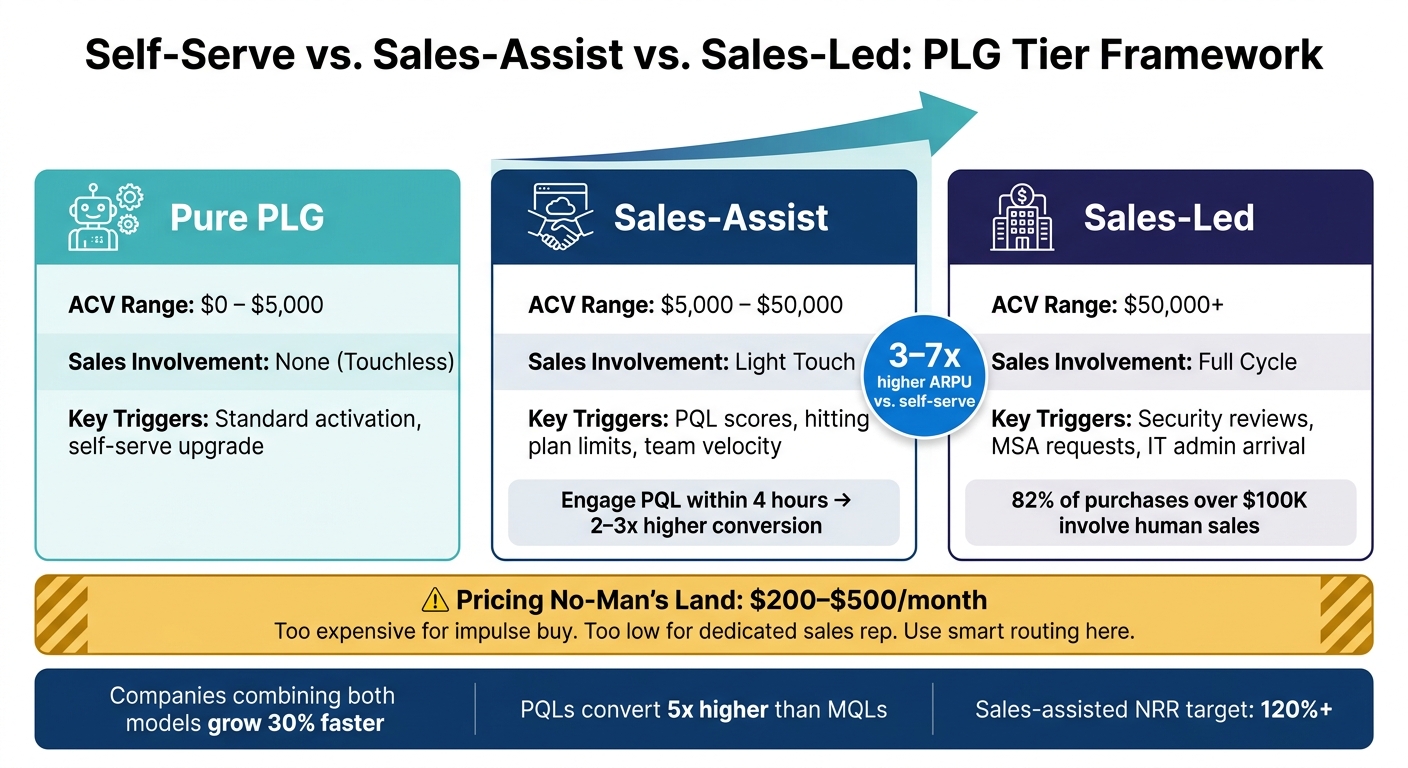 :::
:::
Once you've identified the limits of a self-serve model, the next step is knowing when to step in with a human touch. Spotting the right signals is crucial, but acting on them effectively is just as important. Here's how to determine when sales assist is necessary.
Factors That Drive the Decision
There are four main indicators that point to the need for human intervention.
Deal size is often the clearest sign. For deals exceeding the $10,000–$15,000 ARR range, the potential revenue justifies the cost of involving a sales rep [8]. To put this into perspective, sales-assisted deals typically generate 3–7x higher initial ARPU compared to self-serve channels [4].
Buyer complexity is another key factor. If a purchase requires approval from stakeholders like CFOs, IT, legal teams, or procurement, automated nudges won’t seal the deal. A salesperson is essential to handle these layers of decision-making and address compliance or ROI concerns.
Implementation requirements also play a role. When a prospect needs custom integrations, workflow adjustments, or tailored solutions that go beyond standard documentation, relying solely on self-serve could risk losing the sale.
Lastly, decision-making authority is critical. If the user engaging with your product doesn’t have the authority to approve the budget, a salesperson is needed to guide the process. This is especially true for mid-market and enterprise accounts, where 82% of purchases over $100,000 involve human sales interactions [3].
These factors ensure a smooth shift from self-serve to sales assist, addressing the unique challenges faced by enterprise buyers.
A Simple Framework: Self-Serve vs. Sales Assist
To simplify your approach, use this tiered model based on your target ACV and product signals:
| Segment | Target ACV | Sales Involvement | Key Triggers |
|---|---|---|---|
| Pure PLG | $0–$5,000 | None (Touchless) | Standard activation, self-serve upgrade |
| Sales-Assist | $5,000–$50,000 | Light Touch | PQL scores, hitting plan limits, team velocity |
| Sales-Led | $50,000+ | Full Cycle | Security reviews, MSA requests, IT admin arrival |
For customers with a lifetime value under $1,000, staying fully self-serve is the most cost-effective approach [9]. However, for higher-value accounts, introducing sales assist makes sense - especially when product usage signals indicate readiness.
Engaging a Product-Qualified Lead (PQL) within 4 hours of a trigger event - after they’ve completed key workflows - can lead to 2–3x higher conversion rates [8][5].
"If 40% of your trial users work at companies that would represent 80% of your revenue, but they never convert through self-serve, you need sales." - Kris Carter, Founder, Segment8 [5]
Sales assist should enhance, not replace, your self-serve model. It’s about stepping in when buyer signals show that human support is necessary.
How to Build a Sales-Assist Motion
After recognizing the need for a sales-assist motion, the next step is to integrate it smoothly with your existing self-serve model. The aim isn't to replace the product-led experience but to complement it. Think of sales assist as a supportive layer: users can still explore independently, but sales steps in when the right signals indicate it's time.
Moving Users from Product to People
Timing is everything. Engage users only after they've had 7–10 days to explore and complete key workflows [5]. Reach out post-activation with tailored, helpful messages, such as, "I noticed you invited your team - need help setting up permissions?" This ensures the interaction feels natural and not intrusive. Importantly, keep the self-serve checkout option available; don’t replace it with a mandatory demo.
The next step is to use product data to qualify leads with precision.
Using Product Data to Qualify Leads
A scoring model is essential to identify when human involvement adds value. Focus on metrics like identity, team activity, intent, and company size to qualify leads effectively [11].
For example, set thresholds like these:
- Teams with 5+ users
- Usage of 3+ core features
- Companies with 100+ employees [3]
Once a lead hits these benchmarks, routing becomes straightforward:
- High-identity, high-scale accounts go to Account Executives.
- Mid-market accounts with strong team signals are handled by sales-assist.
- Other leads remain in automated nurture flows.
This targeted approach pays off. Companies using usage-based qualification models report a 28% higher conversion rate to enterprise contracts compared to time-based methods [3].
How Sales, Customer Success, and Product Work Together
Defining clear roles is critical for a successful sales-assist motion. Here’s how responsibilities typically break down:
| Role | Primary Responsibility | Key Metric |
|---|---|---|
| Product | Self-serve flywheel & event telemetry | Activation Rate |
| Sales-Assist | Resolving friction & solution selling | PQL-to-Opportunity Conversion |
| Account Executive | Enterprise contracts & procurement | New ARR / ACV |
| Customer Success | Value realization & expansion | Net Revenue Retention (NRR) |
| SDR/BDR | Inbound management & PQL mining | Qualified Pipeline |
In the early stages of transitioning to a product-led growth (PLG) model, Customer Success Managers (CSMs) often make the best first "sales" hires rather than traditional Account Executives (AEs) [1]. As the process matures, AEs can take on complex enterprise deals, while CSMs focus on expanding relationships with existing accounts.
Product teams play a crucial role by ensuring the self-serve path remains frictionless and by instrumenting the product with reliable event telemetry. Without accurate data, PQL scoring falls apart, leaving sales teams blind to customer signals. To keep everyone aligned, consider creating a one-page strategy document that outlines PQL thresholds, ownership boundaries, and handoff criteria.
Pricing That Supports Both Self-Serve and Assisted Conversion
To make your sales-assist strategy effective, your pricing structure needs to support both self-serve and assisted conversion paths. The key is to align pricing with user behavior so that both casual users and enterprise buyers have a clear path forward. If your pricing tiers are confusing, self-serve users may feel lost, and enterprise buyers might not know when to reach out for assistance. The goal is to create a pricing model that makes sense for both audiences.
Usage Thresholds and Plan Tiers
A well-structured pricing model typically includes three tracks based on annual contract value (ACV):
- Self-Serve: Accounts up to $5,000/year operate without sales involvement, relying entirely on automation.
- Sales-Assist: Accounts in the $5,000–$50,000/year range are flagged for light-touch sales outreach, often triggered by product-qualified lead (PQL) scoring.
- Enterprise: For accounts above $50,000/year, full-cycle sales engagement is required, including custom contracts and security reviews [5].
The tricky area lies in what’s often called the "No-Man’s Land" - pricing between $200 and $500/month. This range is too expensive for an impulse credit card purchase yet too low to justify a dedicated sales rep without automation. A smart approach here is to create a "fork in the road." For example:
- Small teams with fewer than 10 seats see a standard self-serve pricing page.
- Larger teams are directed to a "Custom – Book a Call" option.
This approach reduces friction for smaller businesses while ensuring larger accounts receive the attention they need. Why does this matter? Deals involving 10 or more seats have a much higher lifetime value - $9,800 compared to $2,300 for smaller teams [12]. This difference justifies routing larger accounts to sales.
Next, let’s explore how feature gating can help transition users to sales.
Feature Gating and Enterprise Contracts
Feature gating is a practical way to encourage enterprise users to engage with sales. Reserve advanced features - such as SSO, compliance reporting, custom integrations, or detailed security exports - behind a "Contact Sales" button instead of allowing self-serve upgrades [12].
Clicks on these gated features, like SSO or advanced integrations, can act as strong signals of intent. For example, 60% of deals involving 10 or more seats require features like SSO or custom integrations [12]. These clicks are reliable indicators that the account is ready for sales outreach. A simple rule: if a feature requires solutions engineering to implement, it’s better suited for sales involvement than self-serve.
For enterprise contracts, transparency is key. Display a starting price (e.g., "Starting at $10,000/yr") to set expectations upfront. This helps filter out accounts that aren’t a good fit, saving your sales team valuable time [12].
Here’s a breakdown of how pricing, features, and support levels align across tiers:
| Tier | ACV Range | Feature Strategy | Support Level |
|---|---|---|---|
| Good (SMB/Solo) | < $5,000/yr | Core workflow, basic reporting | Self-serve / Community |
| Better (Mid-Market) | $5,000–$50,000/yr | Advanced reporting, integrations | Email / Chat + Sales-Assist |
| Best (Enterprise) | $50,000+/yr | Custom reports, API, SSO, Compliance | Dedicated Manager + Full-Cycle Sales |
Measuring What Works in a Hybrid PLG Model
Once you've established pricing tiers and feature gates, the next step is tracking both product analytics and revenue to ensure your system is performing as intended.
The Core Metrics to Track
One of the most critical metrics is conversion rate by motion. For self-serve, aim for a 10–15% signup-to-paid conversion rate. On the sales-assisted side, the target is a 25–35% conversion rate from Product-Qualified Lead (PQL) to closed deals [1]. If your numbers fall short of these benchmarks, it’s a clear sign that something in your process needs attention.
Another key area to monitor is PQL volume and quality. PQLs typically convert at a rate five times higher than traditional Marketing-Qualified Leads (MQLs) [10]. This makes the PQL-to-opportunity rate a crucial metric. If this rate drops below 15%, your qualification criteria might be too broad [8].
Here’s a quick summary of the benchmarks you should aim for:
| Metric | Self-Serve Benchmark | Sales-Assisted Benchmark |
|---|---|---|
| Conversion Rate | 10–15% (Signup-to-Paid) [1] | 25–35% (PQL-to-Closed) [1] |
| ACV Range | <$15,000/year [1] | $15,000–$100,000/year [1] |
| CAC Payback | <12 months [1] | <12 months [1] |
| NRR Target | 100%+ | 120%+ [8] |
One often-overlooked metric is Net Revenue Retention (NRR). For sales-assisted accounts, NRR above 120% is a strong indicator that your team is landing deals with accounts that have room to grow [8]. This reflects healthy customer expansion, which is vital for long-term success.
By keeping a close eye on these benchmarks, you can identify areas for improvement and refine your hybrid model as needed.
Using Data to Refine the Model Over Time
A hybrid PLG model requires ongoing adjustments. As your business evolves, the criteria that define a PQL today may no longer apply in six months. Regularly reviewing your revenue mix is essential to ensure that adding a sales-assisted motion doesn’t cannibalize your self-serve revenue. Both approaches should thrive independently [1].
"The goal isn't to have one motion outperform the other. It's to have both motions performing well in their respective segments." - Tara Minh, Senior Operations & Growth Strategist, Rework [1]
Timing also plays a significant role. Engaging a PQL within four hours of a trigger event can boost conversion rates by 2–3x compared to waiting 48 hours [8]. If your data reveals delays in outreach, address those process issues before tweaking your qualification criteria. Additionally, usage-based qualification models have been shown to deliver 28% higher conversion rates for enterprise contracts [3], underscoring the importance of aligning routing logic with product behavior.
Conclusion: Building a Growth Model That Lasts
Here’s the takeaway: self-serve and sales-assist strategies work best together, not apart. The most successful companies know how to balance these approaches and deploy them at the right time.
The key is in your product data. If you introduce sales-assist too early, you risk wasting resources. Wait too long, and high-value customers might get stuck in a self-serve process that doesn’t meet their needs. Look for signals like lower conversion rates among larger accounts, users hitting plan limits, or interest in enterprise-only features. These are clear signs that it’s time to add a human touch. Getting this timing right is what makes hybrid growth sustainable.
"The most effective PLG companies eventually build sales teams to complement their product-led motion, not replace it." - Tomasz Tunguz, Venture Capitalist, Redpoint [3]
The key to sustaining a hybrid model is discipline. Sales shouldn’t block the self-serve path; instead, they should act as an accelerator for customers who need extra help. In mature models, self-serve typically handles about 80% of new customers, while sales focuses on the remaining 20% that require personalized guidance [6].
A growth model that lasts isn’t about being the fastest or most aggressive - it’s about being precise. By using both self-serve and sales-assist strategies thoughtfully, you can align user support with product signals, ensuring every customer gets the right help at the right time.
FAQs
::: faq
How do I set PQL triggers for sales-assist?
To effectively identify Product Qualified Leads (PQLs) for sales-assist, focus on the behaviors and actions that signal a user is ready for a deeper conversation. These might include key engagement signals like:
- Feature adoption: Are users actively using core features that align with their needs?
- Usage frequency: Have they reached a certain threshold of activity or engagement?
- Intent-driven actions: For example, upgrading their plan, inviting team members, or exploring premium features.
Once you've pinpointed these behaviors, establish clear criteria for what qualifies as a PQL. Then, set up automated alerts in your CRM or customer success platform. This ensures your sales team is notified as soon as these signals are detected, allowing them to focus on prospects with the highest potential. :::
::: faq
When should sales-assist reach out to a trial user?
Sales-assist teams should step in when a trial user demonstrates enterprise-level intent or shows signs of high potential value.
These signals might include:
- Inquiries about complex deal structures
- Questions related to security or integrations
- Requests for executive sponsorship
By focusing on these cues, outreach becomes more timely and relevant. This approach ensures resources are used efficiently and targets users who are ready for a more personalized, human-driven sales process - ultimately boosting conversion rates. :::
::: faq
How do I prevent sales-assist from hurting self-serve conversions?
The key to blending sales-assist with a self-serve model is balance. Instead of interrupting users, look for natural opportunities to step in. For instance, monitor user behavior for signs of friction, like struggling with complex features or expressing interest in enterprise-level options. These moments are ideal for targeted actions, such as following up on product-qualified leads (PQLs).
When sales-assist is introduced, ensure it transitions smoothly. A seamless CRM handoff is crucial to keep the experience frictionless and user-friendly. At the same time, track metrics like user engagement and revenue to refine your approach. The goal is to improve the self-serve journey without overwhelming users or making them feel pressured. :::
Related reading
- SaaS CRO in 90 Days: A Practical Growth Blueprint
- The First 48 Hours: What High-Converting SaaS Onboarding Flows Do Differently
- How to Diagnose a Leaky SaaS Funnel in Under an Hour
- SaaS Pricing Psychology: Why Anchoring, Decoy Tiers, and Round Numbers Work
- Why Your Pricing Page Is Losing You Customers (and How to Redesign It)
Useful tools & services
Go deeper than any blog post.
The full system behind these articles—frameworks, diagnostics, and playbooks delivered to your inbox.
No spam. Unsubscribe anytime.