SaaS Onboarding Emails: 12 Sequences That Convert Trial Users to PaidSaaS Churn Benchmarks by Industry: Where Do You Stand?
12 practical onboarding email sequences to convert SaaS trial users, reduce early churn, and improve retention with behavior-triggered and urgency tactics.
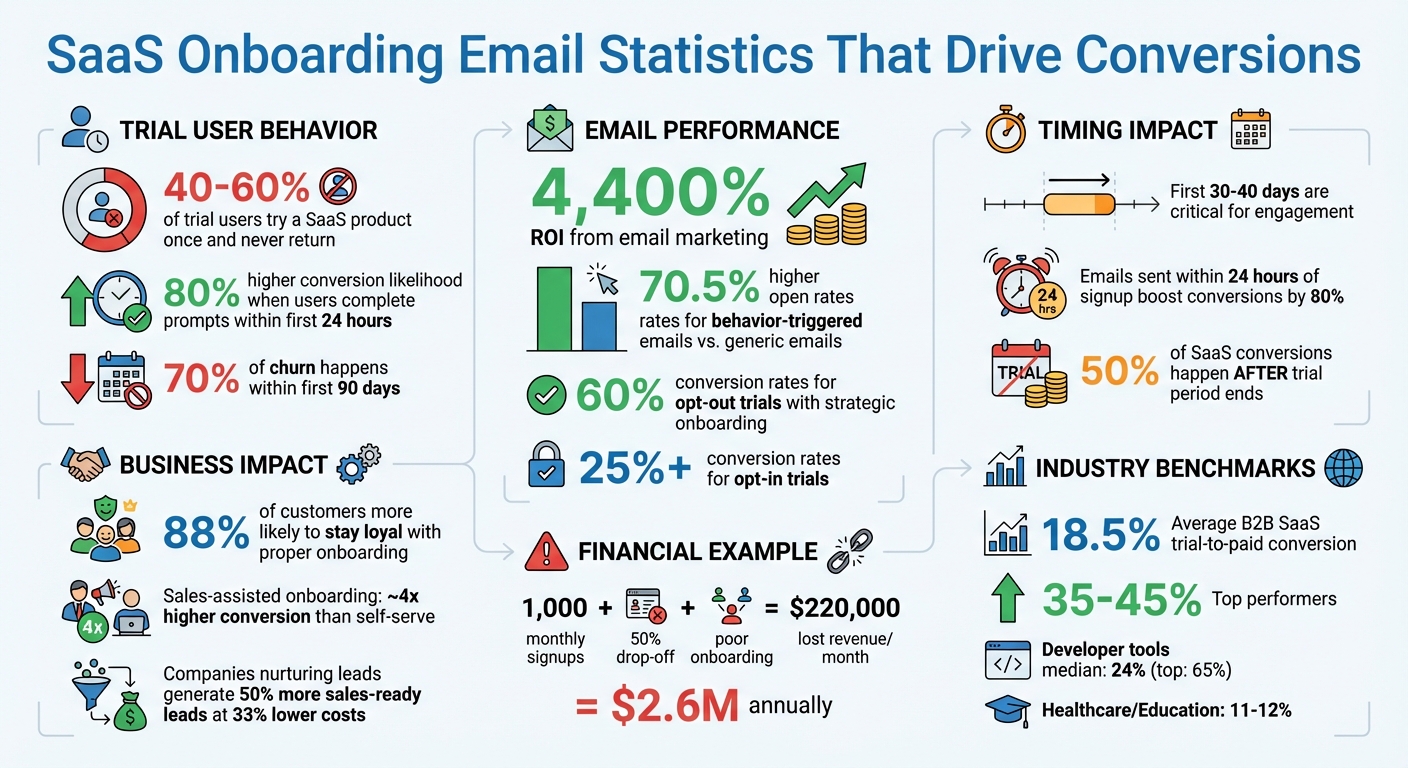
Most trial users never convert to paying customers. Between 40–60% of free trial users try a SaaS product once and never return. But strategically crafted onboarding email sequences can change this. Companies using email to guide users to their "Aha!" moment - when they see the product’s value - report up to 60% conversion rates for opt-out trials and over 25% for opt-in trials.
Here’s what you need to know:
- Email Works: Email marketing delivers a 4,400% ROI, making it a powerful tool for onboarding.
- Timing Matters: The first 30–40 days are critical for engagement. Emails sent within 24 hours of signup can boost conversions by 80%.
- Personalization Wins: Behavior-triggered emails, tailored to user actions, have 70.5% higher open rates than generic ones.
- Retention is Key: 70% of churn happens within the first 90 days. Proper onboarding reduces churn and increases loyalty.
This article breaks down 12 email sequences to maximize trial-to-paid conversions, tackle churn, and improve user retention. It also highlights SaaS churn benchmarks across industries, helping you measure where you stand.
Want a quick snapshot of these strategies? Keep reading to see how onboarding emails can drive consistent revenue growth for SaaS businesses.
SaaS Email Marketing: Beyond Onboarding Emails
Why Onboarding Email Sequences Matter for Revenue
Onboarding emails play a crucial role in driving trial-to-paid conversions, minimizing early churn, and boosting customer lifetime value. Here's a striking stat: free users who complete onboarding prompts within their first 24 hours are nearly 80% more likely to convert to paid customers compared to those who don't [5].
The financial stakes are massive. Let’s break it down with an example. Imagine a SaaS company with 1,000 monthly signups, a 50% drop-off rate, a $40 customer acquisition cost (CAC), and a $400 lifetime value (LTV). Poor onboarding could result in $220,000 in lost revenue every month - or a staggering $2.6 million annually [9]. Every trial user who churns represents wasted acquisition spend. Well-crafted onboarding emails, however, can steer users toward their "Aha!" moment, where they truly see the value of your product.
Sales-assisted onboarding emails, such as personalized demo invites or one-on-one check-ins, can supercharge conversions. In fact, these approaches can increase conversion rates by nearly four times [3]. A great example is the SaaS startup HeadReach, which in 2017 doubled its trial-to-paid conversion rate from 1.5% to 3% by implementing a structured onboarding email sequence [5]. Similarly, Kommunicate achieved 66% growth by using automated onboarding emails with dynamic personalization [6].
But onboarding isn’t just about conversions - it’s also about loyalty. 88% of customers report being more likely to stay loyal to a business that invests in onboarding content that welcomes and educates them [3]. This loyalty translates into higher lifetime value and reduced churn. Companies that excel at nurturing leads generate 50% more sales-ready leads at 33% lower costs [5], underscoring how essential effective onboarding is.
| Metric | Revenue Impact |
|---|---|
| 24-Hour Prompt Completion | 80% higher conversion likelihood [5] |
| Sales-Assisted Conversion | ~4x higher than self-serve [3] |
| Customer Loyalty | 88% more likely to stay with proper onboarding [3] |
| Lead Generation Cost | 33% lower for nurtured leads [5] |
These numbers highlight why onboarding emails are so impactful, setting the stage for the 12 email sequences that can transform trial users into loyal, paying customers.
1. Welcome and Trust-Building Sequence
The welcome email is a powerhouse in your onboarding process, boasting open rates between 30% and 60% - far surpassing other messages in the sequence [3]. Timing is everything here. This email should hit the user’s inbox within minutes of account creation, not hours later or the next day [10]. This is your chance to confirm their choice and nudge them toward taking that all-important first step while their interest is still fresh.
Timing and Frequency of Emails
Think of your welcome email as "Day 0" in a series that typically spans 7–10 days [3][10]. For more complex SaaS products, you’ll want to send 8–10 emails over two weeks. Simpler tools? Stick to 3–5 emails in the first week [9]. To add a personal touch, consider sending a follow-up about three hours after the initial welcome email. A plain-text message from your founder or a customer success manager - something as simple as "Why did you sign up?" - can spark meaningful conversations and gather valuable feedback [4][11]. This sets the stage for a personalized onboarding experience.
Personalization and Relevance of Content
True personalization goes way beyond just adding a first name. For example, SE Ranking started using welcome emails in April 2024 that feature industry-specific intro videos tailored to signup poll data - digital agencies see one message, while in-house SEO teams see another [2]. Similarly, Eight Sleep includes a photo of their founder and a personal story in their first email, making the brand feel approachable and relatable [13].
Clear Call-to-Action (CTA) Design
Each email should focus on one primary CTA to avoid overwhelming the recipient with too many options [11][7]. Use clear, action-oriented labels like "Create my first task" or "Start scheduling", and ensure the CTA links directly to the relevant tool, cutting out unnecessary steps [11][9][1]. Also, make sure your emails come from a real, monitored address - this small detail builds trust and encourages engagement [1][3].
2. Feature Activation and Aha-Moment Sequence
After users open their welcome email, the next step is guiding them to their "Aha!" moment - when the value of your product becomes crystal clear. This step usually takes place around Day 3–4 of the onboarding process. Instead of overwhelming users with every feature, focus on helping them achieve one meaningful result [10]. This phase builds on the welcome email by diving straight into your product's functionality.
Timing and Frequency of Emails
Timing is everything. The first 24 to 48 hours after a user signs up is your golden opportunity - this is when your product is fresh in their mind [10]. Use a behavior-driven approach: if a user hasn’t completed a key task by Day 2, send a nudge. Trigger-based emails, which are sent based on user actions (or inaction), have 70.5% higher open rates compared to traditional time-based emails [4]. If users haven’t taken the desired action, send a follow-up within 24–48 hours, but limit it to one email per day [1].
Personalization and Relevance of Content
Building on the personalized welcome, this phase uses user-specific data to encourage key actions. A generic feature tour won’t cut it. Instead, segment users by factors like their role, industry, or goals shared during signup [8]. For example, if a user identifies as a "RevOps Manager", send them workflows tailored to revenue operations. This level of personalization matters: free users who engage with onboarding prompts within the first 24 hours are nearly 80% more likely to upgrade to paid plans [8]. Use a welcome survey after signup to collect this data and trigger personalized email tracks based on their responses.
Clear Call-to-Action (CTA) Design
Every feature activation email should focus on one specific action rather than bombarding users with multiple options [7]. Use clear, actionable language that directs them toward an immediate task, such as "Create your first video" or "Find your first leads", rather than vague phrases like "Explore features." For example, Buffer uses a simple CTA like "Add to queue" to guide users instantly [3]. Ensure your CTA button links directly to the relevant page, and for longer emails, repeat the CTA once after explaining the benefits and again at the end [7].
Tackling User Pain Points
Here’s a striking stat: 40% to 60% of users who sign up for a SaaS trial only use the product once and never return [4]. To combat this, your feature activation sequence should address common areas where users get stuck. Use targeted nudges to assist those who haven’t completed a core activation step [7]. Focus on the outcomes - how your product helps users complete tasks faster, easier, or more effectively.
As Wes Bush, Founder of ProductLed, explains:
"The goal with these onboarding emails is customer success, not product sales." [1]
3. Problem-Solution Alignment Sequence
After the activation phase, the focus shifts to addressing the user's primary challenges. This step is all about showing how your product tackles their most pressing issue. Instead of just highlighting features, the messaging zeroes in on outcomes. For instance, if a user signed up to improve slow lead generation, demonstrate how your tool identifies a qualified lead in just 15 seconds - not simply how the search feature operates [3].
Timing and Frequency of Emails
The timing of this sequence should depend on user behavior rather than a fixed schedule. For example, if a user completes their first significant action but doesn’t return within 24 hours, send a follow-up email that reminds them of the value your product delivers. For users who haven’t engaged at all, send a nudge within 48 hours to address a common roadblock they might be facing [4].
Personalization and Relevance of Content
Behavior-based triggers allow for highly tailored content. Segment users by their specific goals or "Jobs-to-be-Done" (JTBD) - the outcomes they’re aiming for [11][15]. For example, if a user identifies as a "marketing manager" during signup, craft the email to highlight how your product simplifies campaign automation, rather than focusing on generic features. Use benefit-driven language to emphasize solutions. Instead of saying, "Our AI enrichment feature", try something like, "Save hours of manual work - our AI fills in missing contact details instantly."
Clear Call-to-Action (CTA) Design
Every email should encourage users to take one specific action that advances their engagement [11][7]. Use direct, action-oriented language like "Import your contacts to tackle your lead challenge" or "Create my first task" instead of vague phrases like "Learn more." For shorter trial periods, create urgency with phrases such as "Your trial ends in 3 days - see results now." For longer trials, focus on outcomes: "Get your first report live." Ensure the CTA button is prominently placed and links directly to the relevant in-app page.
Effectiveness in Addressing User Pain Points
This sequence is designed to reduce early drop-offs by clearly showing users the value they could be missing. For example, in August 2024, Clay introduced a 6-part onboarding email series, with each email focusing on a specific actionable step - like "Find your first leads" or "Boost data with AI" - helping users complete essential workflows [6]. As Kalo Yankulov, Co-founder of Encharge, explains:
"Onboarding emails can do one thing that your product can't: Get your users back to your site. Think of onboarding emails as the glue between one stage of your funnel and the next." [4]
4. Best Practices and Tutorial Sequence
Once users understand the value of your product, tutorial emails can guide them through essential workflows, transforming initial interest into regular usage without overwhelming them.
Timing and Frequency of Emails
Timing is everything when it comes to tutorial emails. Send the first email within 24 hours of signup to leverage the user's peak motivation [12][2]. For a 14-day trial, aim for about five emails in the first week and increase to 7–10 emails in the second week [3]. Behavior-triggered emails are especially effective, boasting 70.5% higher open rates [4]. For example, SE Ranking sends a "First Step" email if a user hasn’t added a project within two business days [2].
Personalization and Relevance of Content
Focus each tutorial email on a single, actionable task instead of overwhelming users with a long list of features. A great example is Clay’s "Clay University", a six-part email series where each message highlights one specific step, such as "Find your first leads" or "Enrichment basics" [6]. Progress-based subject lines, like "You're 20% of the way there", can inspire users to keep going. Typeform uses this approach, gradually introducing users to more advanced topics, which naturally encourages upgrades [6]. This kind of tailored content ensures users stay engaged and are clear about the next step, reinforced by a single, focused call-to-action (CTA).
Clear Call-to-Action (CTA) Design
Every tutorial email should include one clear, action-oriented CTA that links directly to the relevant page [1][6][17]. Replace vague phrases like "Learn more" with specific actions such as "Create your first video" or "Add your 1st project." For example, Zendesk uses a progress bar to motivate users, tying the next step directly to the CTA [18]. A well-crafted CTA not only drives action but also improves the overall impact of your tutorial sequence.
Effectiveness in Addressing User Pain Points
Tutorial email sequences are a powerful tool to combat disengagement, which affects 40–60% of trial users after just one use [3][4]. As Wes Bush, Founder of ProductLed, explains:
"We want our onboarding emails to be just-in-time, not just-in-case" [1].
Users who actively engage with onboarding emails are up to 60% more likely to stay active after the first week [12]. Asana exemplifies this with a step-by-step approach, starting from project setup and progressing to team collaboration and AI-powered automation, aligning perfectly with the user's learning journey [6].
5. Social Proof and Results-Focused Sequence
Once users are familiar with the basics, social proof emails step in to highlight real-world success stories. These emails showcase case studies, testimonials, and measurable outcomes that build trust and credibility [15].
Timing and Frequency of Emails
The timing of social proof emails is critical. Aim to send them mid-trial - around Day 3 or 4, shortly after users experience their first "Aha!" moment, or on Day 6 or 7 as a final push [10][6]. For instance, in August 2025, ActiveCampaign used a 14-day trial sequence where the sixth email featured a case study from Kommunicate. This email detailed how Kommunicate achieved 66% growth through automation, supported by specific customer quotes and ROI figures [6].
Personalization and Relevance of Content
Tailoring social proof to the user’s role or industry makes it far more impactful. For example, a marketing manager is more likely to engage with success stories from fellow marketers [15]. Focus on outcome-driven data like "Saved 10 hours/month" or "Increased conversions by 45%", rather than generic feature lists [9]. A great example comes from Zapier, which in October 2025 sent a results-focused "expiry warning" email just 2–3 days before trial end. This email highlighted the number of "Zaps" users had already run and the features they would lose, creating urgency by emphasizing the personal value users had already gained [15]. This targeted strategy ensures users see success stories that align with their specific challenges and objectives.
Clear Call-to-Action (CTA) Design
Every social proof email should include a single, clear, and action-oriented CTA. Phrases like "Join the team", "Upgrade now", or "See case study" work well [9]. Make sure the CTA button is high-contrast, mobile-friendly, and easy to spot for maximum effectiveness.
Effectiveness in Addressing User Pain Points
Social proof plays a powerful role in reducing uncertainty, a major driver of the 70% early churn rate in SaaS [9]. As Robert Cialdini, author of Influence: The Psychology of Persuasion, explains:
"Social proof is most powerful for those who feel unfamiliar or unsure in a situation and who, consequently, must look outside of themselves for evidence of how best to behave" [9].
6. Behavior-Triggered Sequence
Behavior-triggered emails are a powerful way to engage users based on their actions - or inaction - within your product. Unlike scheduled emails, these are sent in direct response to specific user behaviors, making them timely and relevant. As Wes Bush, Founder of ProductLed, aptly puts it:
"We want our onboarding emails to be just-in-time, not just-in-case" [1].
Timing and Frequency of Emails
Timing is everything with behavior-triggered emails. The moment a user hits a milestone, like becoming a Product Qualified Lead (PQL) by connecting a data source or creating their first project, the sales team should act immediately. For users who stall at critical steps, a follow-up email works best when sent precisely two business days later [1][2].
Take SE Ranking as an example. In April 2024, they introduced a behavior-triggered email targeting users who hadn’t added their first website project. If the action wasn’t completed within two business days, an automated email was sent, including a step-by-step guide and a direct link to the dashboard [2]. The result? These emails achieved a 70.5% higher open rate compared to traditional time-based campaigns [5].
Personalization and Relevance of Content
To make these emails resonate, reference the specific action the user took - or didn’t take. For instance, an email saying, "You created a workspace but your dashboard is empty", feels highly personal and relevant [7]. SurveyMonkey uses this approach by identifying users who draft surveys but don’t send them. They then send tailored reminders with tips to overcome obstacles [14].
Leverage user data collected during signup, like their role, industry, or intended use case, to customize the message. Personalization pays off: free users who complete onboarding tasks within 24 hours are nearly 80% more likely to convert to paying customers [5]. By focusing on one specific action, the email naturally leads to a single, clear call-to-action.
Clear Call-to-Action (CTA) Design
Every behavior-triggered email should focus on one task with a single, clear call-to-action [7]. Avoid overwhelming users with multiple options. Instead, use deep links that take them directly to the exact screen where they can complete the task. For example, CTAs like "Finish your setup" or "Connect your first integration" work well.
This is especially crucial for self-serve products, where reducing friction can make or break user retention. Research shows that 40–60% of trial users interact with software only once before disappearing [4]. A well-placed CTA can be the difference between a one-time user and a long-term customer.
Effectiveness in Addressing User Pain Points
Behavior-triggered emails excel at re-engaging users who face challenges or become inactive [4]. A great example comes from Encharge, where co-founder Kalo Yankulov shared a strategy implemented in April 2024. Three hours after signup, users receive a personal email asking, "Why did you sign up?" This not only gathers valuable feedback but also helps refine the onboarding process in real time [4].
The impact of these sequences is clear: they outperform single welcome emails, delivering an average 51% boost in revenue [14]. By addressing pain points at just the right moment, behavior-triggered emails keep users engaged and moving forward.
7. Urgency and Incentive Sequence
When it comes to converting trial users into paying customers, urgency emails are your final push. As Encharge explains:
"Urgency has everything to do with timing. It's pointless to flood someone's inbox with warnings about a trial expiration before they have started exploring your product" [4].
The key is to focus on the last week of the trial - when users have already experienced your product's value but might need that extra nudge to make a decision [1].
Timing and Frequency of Emails
A well-planned urgency email sequence can make all the difference. Here's a proven cadence:
- Send reminders 3–5 days before the trial ends.
- Follow up 24 hours before expiration.
- Send a final email on the day the trial ends.
- After the trial expires, send a win-back email 7–10 days later with a 40% to 60% discount [4][5].
For users who are highly engaged but haven't upgraded, consider offering a one-time trial extension instead of a discount. This approach gives them more time to reach their "aha moment" without undercutting the perceived value of your product [19].
Personalization and Relevance of Content
Generic countdown emails are outdated. Instead, make your messages personal by referencing specific actions users took during their trial. For example, mention things like "You've created 2 dashboards" or "Your first report is ready." This highlights the value they stand to lose, making your urgency emails feel helpful rather than pushy [10].
For short trials (7–14 days), urgency-focused subject lines like "Your trial ends in 3 days" perform better. On the other hand, longer trials benefit from activation-driven messaging, such as "You're 1 step away from your first forecast" [7]. These tailored messages guide users toward a single, clear call-to-action.
Clear Call-to-Action (CTA) Design
Every urgency email should include a single, standout CTA. Use a high-contrast button with clear text like "Finish trial setup" or "Choose a plan." Place the button both at the top of the email for quick access and at the bottom for those who read through the entire message [18][2][6].
Effectiveness in Addressing User Pain Points
Urgency emails work because they leverage loss aversion - the fear of losing progress or benefits already gained. Frame your message around what users risk losing, such as access to their data, active workflows, or premium features they've been using [4][5].
The impact is undeniable: while the average trial-to-paid conversion rate is between 14% and 25%, companies that use urgency sequences strategically see rates as high as 40% to 60% [19]. Even more striking, about 50% of SaaS conversions happen after the trial period ends, highlighting the importance of post-expiry win-back emails [3]. By addressing users' pain points and reinforcing the value they've already experienced, urgency sequences help turn hesitant trial users into loyal customers.
8. Objection-Handling and Feature Comparison Sequence
Trial users often hesitate to upgrade due to concerns about time, value, or technical complexity. Objection-handling emails are designed to address these doubts head-on. By integrating these emails into your onboarding strategy with thoughtful timing and personalized messaging, you can guide users toward making confident decisions.
Timing and Frequency of Emails
The timing of objection-handling emails is crucial. Send these emails at key moments during the trial period to address specific concerns:
- Time-related concerns: Within the first 1–2 days, emphasize that demos or success calls require just 20–30 minutes [4].
- Value or ROI concerns: Midway through the trial (around day 7 of a 14-day trial), when users have had a chance to explore the product, is the ideal time to address these doubts [4][6].
- End-of-trial urgency: As the trial nears its end, increase the frequency of messages while weaving in objection-specific reminders. Avoid repeating urgency tactics already used earlier in the sequence.
Personalization and Relevance of Content
A generic email listing features won’t cut it. Users respond to messages that speak directly to their concerns. Here’s how to make your emails more effective:
- Make it personal: Use plain-text formatting to create the impression of a personal note from a founder or success manager rather than a mass-marketing email [1][3].
- Focus on solutions: Instead of saying, "Our tool has automation features", explain how automation can solve real issues, like improving low open rates [1][3].
- Trigger helpful offers: If users stall during setup, send emails offering "Success Calls" or "Orientation Demos." Frame these as opportunities to achieve their goals, not as sales pitches [1][4].
A great example comes from LinksSpy. In 2017, they noticed users abandoning signups at the credit card entry stage. They sent a two-email sequence explaining why a card was required (to prevent service interruptions and filter out non-serious users). This simple approach boosted trial signups by 15% [5].
Clear Call-to-Action (CTA) Design
Once you’ve crafted a compelling message, the next step is to guide users toward action. Every email should have a single, focused call-to-action (CTA) that aligns with the objection being addressed:
- For technical concerns: "Get Setup Help"
- For value-related issues: "See How [Company Name] Grew 66%"
- For general conversion goals: "Upgrade Now", "Book a Success Call", or "Extend My Trial"
Keeping the CTA simple and prominent ensures users know exactly what to do next without feeling overwhelmed [1][6].
Effectiveness in Addressing User Pain Points
Objection-handling emails work because they address users’ concerns at the right time with the right message. Studies show that 88% of users are more likely to stay loyal to a business that provides onboarding content that educates and welcomes them [3].
For example, ActiveCampaign uses behavior-triggered emails to engage users who don’t complete signups. These emails highlight over 950 integrations and AI features, paired with case studies like Kommunicate’s 66% growth through automation [6]. The results speak for themselves: assisted conversion rates are nearly four times higher than self-serve rates [3].
9. Personal Outreach and Demo Sequence
Automated email sequences are great for building engagement, but personal outreach often seals the deal with high-intent users. In fact, personal outreach can increase conversions by four times and triple trial-to-paid rates [3]. This is why 75% of SaaS companies now have their sales teams directly contact freemium and trial leads [3].
Timing and Frequency of Emails
The first 30 to 40 days of a user's journey are critical [3]. When it comes to personal outreach, timing beats quantity. Start with a plain-text email from a founder or account executive about three hours after signup. Follow this up with a demo invitation roughly 28 hours later [4]. For short trial periods, this early rhythm creates urgency without overwhelming users.
Personalization and Relevance of Content
Generic sales emails often get ignored. Encharge co-founder Kalo Yankulov demonstrated a better approach in April 2024 by sending plain-text emails three hours after signup with a single, focused question: "Why did you sign up for Encharge?" He then offered a 20–30 minute "success call." This simple strategy led to email open rates exceeding 40% [4]. To make the outreach more effective, address time concerns upfront by clearly stating the call's duration. Early, targeted questions can also help tailor the demo to the user's specific needs [4].
Clear Call-to-Action (CTA) Design
Every personal outreach email should focus on one clear goal. Instead of using generic CTAs like "Book a Demo", try something more user-centric, such as "Let’s get your account set up" or "Start your 30-minute crash course" [20]. This shifts the user’s mindset from “another sales pitch” to “a time-saving session.” ActiveCampaign, for example, uses behavior-triggered sequences to offer a "free strategy session" with their Growth Sales reps for users who haven’t completed setup. They also include success stories, like Kommunicate’s 66% growth, to build trust and confidence [6]. To make scheduling easy, include tools like Calendly and address common concerns in a P.S. - for example, mentioning that the call typically saves users 2–3 hours of manual setup [20].
Effectiveness in Addressing User Pain Points
Personal outreach is powerful because it meets users exactly where they are in their journey. When a user hits a Product Qualified Lead (PQL) status or has an "Aha!" moment, reaching out within minutes maximizes the opportunity [1]. For users who’ve gone quiet for 48 hours, a well-timed nudge offering assistance can prevent them from abandoning their trial. The stats support this: 88% of customers are more likely to stay loyal to businesses that provide helpful onboarding content [3]. Additionally, half of all SaaS conversions occur after the trial period ends, making follow-up outreach after the trial a key driver of revenue [3].
Next, we’ll look at strategies to re-engage inactive users and maintain momentum after the trial period ends.
10. Re-engagement and Win-Back Sequence
Not every trial user converts right away. In fact, nearly half of all SaaS conversions happen after the trial period officially ends [3]. That’s why re-engagement emails are so important - they can be a game-changer for bringing inactive users back. The key? Timing and crafting messages that hit the right note.
Timing and Frequency of Emails
The first 40 days after signup are critical for conversions - about 80% of SaaS conversions happen during this period, no matter the trial length [3]. If a user hasn’t logged in for 48 hours during their trial, that’s your signal to send a “clear path” email, offering step-by-step guidance to help them complete their first task [2]. For those who don’t convert by the end of the trial, follow up 3 days later with a feedback request to learn what held them back - whether it’s pricing, time constraints, or even a competitor [4][5].
The 90-day lifecycle is a make-or-break period for new users, so it’s crucial to stay in touch consistently. During the trial, near-daily emails work well, but after the trial ends, scale back to 1–2 emails per week [3]. However, don’t overdo it - sending more than one email a day can lead to user fatigue [10].
Personalization and Relevance of Content
Generic “we miss you” emails? They just don’t cut it. Instead, tailor your messages to address the user’s specific challenges. For example, if someone set up a workspace but didn’t add any data, send them a direct link with a quick tip on how to get started [15][7]. If they seem overwhelmed, offer a "30-minute crash course" or link them to a targeted tutorial instead of a vague “come back” message [1][9].
Segment users based on their role or what they’re trying to accomplish (their "Jobs-to-be-Done") and highlight features that align with their goals [15][9]. For users who didn’t see the value in your product, include social proof such as case studies or testimonials from peers in similar industries to show what’s possible [15][9]. Always keep the tone supportive, not pushy, and use a real team member’s name for a personal touch [15][9].
Clear Call-to-Action (CTA) Design
Your re-engagement email should focus on one main action - this helps avoid confusion and keeps things simple [9][10]. Instead of generic CTAs like “Get started,” use action-oriented phrases such as "Resume Setup" or "Watch 2-min Tutorial" [9]. If a user seems stuck, try "Book a Strategy Call"; if they’ve forgotten about your product, go with "See Success Stories" [9]. Make sure the CTA visually stands out with bold colors, high contrast, and plenty of whitespace [9][10].
Effectiveness in Addressing User Pain Points
Behavior-triggered emails are incredibly effective, boasting 70.5% higher open rates than standard time-based emails [4]. Users who complete onboarding tasks within the first 24 hours are nearly 80% more likely to convert to paid plans [5]. For those still undecided 7–10 days after their trial ends, a final “Hail Mary” email with a 40–60% discount can often seal the deal [5]. Since 70% of customers churn within 90 days when onboarding falls short [9], proactive re-engagement during this period can turn potential losses into long-term loyalty.
These strategies lay the groundwork for retention emails, which not only keep customers engaged but also open doors for upselling opportunities.
11. Retention and Upsell Sequence
Turning trial users into paying customers is just the beginning. The real challenge lies in keeping them engaged and encouraging upgrades to maximize revenue. Retention and upsell efforts are essential for maintaining customer satisfaction and driving growth. Thoughtfully designed email campaigns can play a crucial role in achieving these goals.
Timing and Frequency of Emails
The first 90 days after a customer converts are critical, as this is when churn risk is at its highest [3]. During this period, aim to send 1–2 emails per week to maintain engagement. When it comes to subscription renewals, start sending reminders 7–14 days before the expiration date. This ensures users have enough time to take action without service interruptions [3][16].
The best time to initiate upsell efforts is when a user qualifies as a Product Qualified Lead (PQL). A PQL is someone who has hit a key usage milestone or experienced a significant "Aha!" moment. As Wes Bush, Founder of ProductLed, explains:
"The moment a user becomes a PQL is the best time to begin sales outreach. Do not hesitate or hold back from contacting your PQLs because you will never have a better chance at converting them" [1].
To capitalize on this, send upsell emails immediately after the qualifying event. This timely outreach not only boosts conversion chances but also reinforces the value users derive from your product, paving the way for meaningful upgrades.
Personalization and Relevance of Content
Tailor your emails using specific usage data to highlight the value customers are already experiencing. For instance, you could include metrics like "You imported 150 deals this month" or "You saved 12 hours using automation" to remind users why your product is indispensable [21]. Midway through their cycle, consider sending a progress summary that celebrates their achievements and opens the door to an upgrade conversation [1].
Segment your audience based on behaviors and decision stages - whether they're still exploring, comparing plans, or ready to upgrade [9]. For users who hit a milestone, a "success meeting" email can acknowledge their progress and introduce premium features aligned with their goals [1]. Emails triggered by user actions consistently outperform those tied to arbitrary dates, so focus on real-time engagement. This approach ensures your communication feels relevant and timely, increasing the likelihood of upgrades.
Clear Call-to-Action (CTA) Design
Each email should focus on a single, clear call-to-action (CTA) such as "Renew Now", "Upgrade to Pro", or "Invite Your Team" [7]. Avoid overwhelming users with multiple options that dilute the message. Instead, frame your CTA around the benefits they’ll gain. For example, "Double your conversion rates now" is far more compelling than a generic "Upgrade" button [7].
For retention emails, offering flexibility can be a game-changer. Allow users to downgrade or pause their subscription instead of canceling outright. This can help maintain recurring revenue while giving users breathing room [16]. In the final 24–48 hours before a subscription expires, send a "last chance" email emphasizing the potential loss of critical data if they don’t renew [4][21].
Effectiveness in Addressing User Pain Points
Retention sequences are designed to tackle one of the biggest challenges: nearly 70% of customers churn within the first 90 days if their initial experience doesn’t meet expectations [9]. By consistently showcasing value during this crucial period, you can reduce churn while uncovering opportunities to upsell. On average, B2B SaaS trial-to-paid conversion rates fall between 15% and 30%, but companies with opt-in free trials often achieve rates above 25% [3][21].
The key to success lies in shifting from generic, "just-in-case" content to "just-in-time" messaging. Emails that respond to real-time user behavior and provide tangible proof of value make a stronger impact [1]. When customers see how your product improves their workflow or saves them time, the upgrade often feels like a natural next step. This strategy not only boosts metrics like Average Revenue Per User (ARPU) and Monthly Recurring Revenue (MRR) [3][1][5] but also fosters long-term loyalty, turning customers into advocates for your brand. By focusing on retention and upsell, you’re addressing the final phase of the customer lifecycle: preventing cancellations and gathering insights to improve future experiences.
12. Cancellation Prevention and Feedback Sequence
Even the most well-designed onboarding process won’t keep every user around. The goal isn’t just to stop cancellations - it’s about understanding why users leave and finding ways to bring them back. Between 40% and 60% of trial users log in once and never return [4]. This strategy works alongside retention efforts, turning cancellations into opportunities for feedback and future engagement.
Timing and Frequency of Emails
Timing is everything when it comes to re-engaging users. If someone hasn’t logged in for 5–7 days, send a friendly check-in email offering guidance instead of pushing a sale. For users who abandon a critical setup step, a targeted nudge within 24 hours can help them overcome hurdles.
As the trial nears its end, send a reminder 3 days before the expiration to highlight the product’s value. Follow this with a final email 24 hours before the trial ends to create urgency. After the trial, send a feedback survey 3 days later to gather insights. To win back users, a "Hail Mary" offer - sent 7–10 days after the trial ends - can work wonders. Offering a steep discount (40–60%) often encourages hesitant users to give the product another shot. Keep emails spaced out, with no more than one per day, to avoid overwhelming recipients.
Personalization and Relevance of Content
Generic goodbyes won’t cut it. Instead, reference specific user actions, like "You’ve created 2 dashboards and invited 5 teammates", to remind users of the progress they’ve made. Segment users based on their reasons for canceling: for example, if someone didn’t have enough time to explore, offer an extended trial. If they found the product too complex, propose a personal demo or success call.
Leverage behavior-based triggers from your billing platform to send timely feedback requests when a subscription is canceled. Keep these emails short and focused on one open-ended question, like, "What worked or didn’t work for you?" For high-value accounts, consider sending the email from a team member or even the founder to build trust and show users they’re valued.
Once you’ve personalized the message, guide users toward one clear next step.
Clear Call-to-Action (CTA) Design
Each email should focus on one goal with a single, clear CTA. Examples include: "Reactivate your account", "Schedule a call", or "Claim your 20% discount." For inactive users, tailor the CTA to their specific challenges, such as, "Still looking for a solution to [specific pain point]?"
To make the process easier, include interactive elements like rating stars or NPS surveys. These reduce friction and make it simpler for users to provide feedback. Plain-text emails that invite users to reply directly can add a personal touch, while bold, high-contrast CTA buttons and "Last Chance" messaging in final reminders create polite urgency.
Effectiveness in Addressing User Pain Points
Ignoring churn can be costly [9]. Reducing churn by just 5% can increase revenue by up to 75% [22]. To prevent cancellations, engage users at critical moments by offering trial extensions, personalized calls, or even plan downgrades to address their concerns directly.
The feedback you gather doesn’t just help improve your product - it also allows you to craft targeted win-back campaigns. Whether users leave due to missing features, pricing concerns, or usability issues, treating cancellations as the start of a conversation can lead to meaningful product improvements and future conversions.
SaaS Churn Benchmarks by Industry
Understanding how your churn rate stacks up against industry standards can help identify whether the root of the problem lies in product issues or onboarding struggles. For B2B SaaS companies, the average monthly churn rate hovers around 4–5% [3]. If your churn rate hits 10% or more, you could lose your entire customer base within a year. Think of this metric as an early-warning system.
Retention rates vary widely across industries. For instance, sectors like manufacturing, consumer goods, and media often achieve higher retention, while financial services and government sectors tend to struggle [23]. One reason for this disparity is that vertical SaaS solutions - those tailored to specific industries - often foster greater trust than horizontal tools. Products designed to meet unique workflows and compliance requirements naturally encourage longer customer relationships. Aligning your onboarding strategy with these industry-specific patterns can make a big difference in retention.
Trial-to-paid conversion rates also show notable differences between verticals. Developer tools, for example, see a median conversion rate of 24%, with top performers reaching an impressive 65%. In contrast, healthcare and education platforms lag behind, with median conversion rates around 11–12% [24]. Buyers with technical expertise tend to convert and stick around at twice the rate of general business buyers, as they quickly grasp the value the product delivers [24].
Geography plays a significant role as well. North American SaaS companies report a median trial conversion rate of 20%, while APAC averages 15%, and Latin America comes in at about 13% [24]. In emerging markets, factors like price sensitivity and varied payment preferences often create hurdles in converting trials to paid subscriptions. Adapting your interface and payment methods to local needs can boost conversions by as much as 67% [24]. These geographic variations highlight the importance of customizing your approach based on the region.
The first 90 days are especially critical, as this period sees the highest churn risk. During this time, software products can lose up to 70% of users, with 30% leaving due to competitive offers [23][3]. Smaller companies (fewer than 200 employees) often experience stronger retention during the first two months. However, larger enterprises (2,500+ employees) tend to catch up by the third month, as their slower but more comprehensive implementations result in deeper integrations [23]. Recognizing these patterns is essential for refining your onboarding and retention strategies throughout the customer journey.
How to Measure Onboarding Email Performance
To fine-tune your onboarding email strategy, tracking the right metrics is key. Start with open rates, which reveal how well your subject lines grab attention. For welcome emails, aim for an open rate of 60% or higher. Trigger-based emails - those sent in response to user actions - perform even better, boasting a 70.5% higher open rate compared to standard time-based messages[1][4].
Next up is click-through rates (CTR), which show how effectively your email content and calls-to-action (CTAs) inspire users to take the next step. A solid CTR benchmark to aim for is between 10–20%[10]. But CTR alone isn’t enough; you also need to measure activation rate to see how email engagement translates into product usage.
Activation rate is particularly critical because it tracks the percentage of users who complete a key action - often referred to as the "Aha! moment" - after engaging with your email. The median activation rate is 52%, but top performers hit 70–75%. Even a 10% boost in activation can lead to a 6–10% increase in trial-to-paid conversions. Timing also matters: users who act on onboarding prompts within the first 24 hours are nearly 80% more likely to become paying customers[5][24].
The ultimate measure of success? Trial-to-paid conversion rates. In 2025, the median conversion rate for B2B SaaS companies is 18.5%, while top-tier companies achieve 35–45%[24]. For example, VoiceDrop skyrocketed its trial-to-paid conversion from 12% to 57% in just 30 days by cutting its Time to First Value (TTFV) from 45 minutes to 8 minutes and introducing behavioral payment triggers. Similarly, a B2B analytics platform boosted its conversion rate from 14% to 38% by offering sample data for immediate value realization[24].
Finally, keep an eye on churn rates and TTFV to ensure long-term success. Reducing churn in the first 90 days is a strong indicator of lasting engagement. Two key metrics to track here are Day-30 retention (the percentage of users still active after 30 days) and early churn rate (cancellations within 90 days). With the average monthly churn rate for B2B SaaS hovering around 4–5%[25], effective onboarding emails can help keep churn below this threshold. Speed is also crucial - top-performing companies achieve TTFV in under 12 minutes, as every 10-minute delay can slash conversions by around 8%[24].
Conclusion
Converting trial users into paying customers depends on sending well-timed, targeted emails. The 12 sequences outlined here succeed because they focus on precise timing, clear calls-to-action, and guiding users to their "Aha!" moment. Optimized onboarding emails can drive a 3.5x boost in paid conversions[26], and the gap between average performers (18.5% conversion) and top-tier companies (60%+) often comes down to how effectively these strategies are executed[24].
Benchmarks are a starting point, not the finish line. For instance, if you're in Developer Tools with a 15% conversion rate, there's room to aim for the 24% median - or even the 65% elite benchmark[24]. In Healthcare, where an 11% conversion rate reflects longer sales cycles and technical challenges, setting realistic goals is key. Start by evaluating your performance against these benchmarks.
Begin by auditing your activation rate. If fewer than 20% of trial users are hitting their first key milestone, address that before diving into payment flows or pricing tweaks[24]. Shift from generic Day 1, Day 3, Day 7 email schedules to behavior-based triggers. Companies using behavioral triggers outperform calendar-based approaches by 67%[24]. These foundational changes can pave the way for stronger engagement beyond the trial phase.
Also, remember that half of SaaS conversions happen after the trial ends[3]. Keep nurturing users for at least 90 days, extending beyond the initial trial period. Adding a human touch - like plain-text emails from a founder or success manager - can make a big difference. Sales-assisted onboarding, for example, can nearly triple conversion rates compared to purely self-serve models[3]. These strategies align with the 12-sequence framework, helping you refine every step of the trial-to-paid journey.
Improvement doesn’t require a complete overhaul. Start small. Test one sequence, tweak one element, and measure the results. Even minor changes, like reducing time-to-first-value by 10 minutes, can deliver an 8% lift in conversions[24]. Incremental adjustments can turn obstacles into opportunities for growth.
FAQs
How do personalized onboarding emails help convert trial users into paying customers?
Personalized onboarding emails work wonders when it comes to turning trial users into paying customers. Why? Because they offer a tailored experience that speaks directly to each user's specific needs and challenges. By crafting messages based on user behavior and preferences, you can showcase the features of your product that matter most to them - helping them quickly grasp its value.
For instance, trigger-based emails can nudge users toward key actions during their trial, like completing the setup process or diving into advanced features. Sending personalized tips, usage updates, or friendly reminders can keep users actively engaged and excited about what your product offers. This not only encourages consistent interaction but also builds trust, making users more likely to commit to a paid plan. When users feel understood and supported, they’re far more likely to make the leap to becoming loyal customers.
Why is timing important for SaaS onboarding email sequences?
Timing plays a crucial role in SaaS onboarding email sequences. It ensures that users receive messages at the moments they’re most likely to engage and take meaningful actions. For example, sending a welcome email immediately after someone signs up creates an instant connection. Similarly, follow-up emails triggered by specific user actions - like completing a setup step or exploring a key feature - can highlight the product's value and nudge users closer to upgrading.
Well-timed emails, especially those tailored to user behavior or significant milestones, can have a big impact on conversion rates. Research shows that refining email timing through methods like A/B testing can lead to noticeable increases in engagement. In short, getting the timing right is a key step in turning free trial users into loyal, paying customers.
Why is it important to solve user challenges during the onboarding process?
Tackling user challenges during onboarding is crucial because it shapes how users perceive your product right from the start. A smooth onboarding experience not only boosts engagement but also makes it easier for users to understand your product's value. When you address frustrations or uncertainties early, you reduce confusion and help prevent users from leaving prematurely.
One effective strategy is sending personalized onboarding emails. These could include usage tips, helpful reminders, or tailored guidance based on a user’s specific journey. This kind of targeted communication shows users that you understand their needs, building trust and encouraging them to stay engaged. The result? Better user retention, higher conversion rates, and stronger long-term loyalty.
Related reading
- How your acquisition strategy influences your conversion rate
- How to A/B test pricing as a boostrapped company
- Upsell vs. Cross-Sell Metrics: Key Differences
- Digital Marketing Services
- What Is Strategy Consulting? (And when to hire a consultant to do it for you)
Useful tools & services
Find the obstacle before adding more onboarding
Review the path to first value and agree which changes your team should implement.
Explore onboarding optimizationNeed help choosing the next change? Explore CRO consulting.
More from each customer
New articles on this, by email.