When to Remove a Feature: The Framework for Sunsetting Without Losing Customers
removing underused features is essential—use a data-driven sunsetting framework to cut technical debt without driving customers away.
Deciding when to remove a feature can save your product from becoming cluttered and inefficient. Most SaaS platforms find that a small percentage of features drive the majority of user activity - often just 5% of features generate 95% of engagement. The rest? They drain resources, confuse users, and slow down your team.
Here’s the key takeaway: If a feature isn’t used often, costs too much to maintain, or no longer aligns with your product’s goals, it’s time to consider removing it. The challenge is doing this without losing customers.
Steps to sunset a feature effectively:
-
Review usage data: Identify features with low engagement (e.g., less than 5% of users or declining activity over 90 days).
-
Compare costs vs. benefits: Assess maintenance costs, user value, and whether the feature overlaps with newer solutions.
-
Plan the transition: Segment users, evaluate risks, and provide clear alternatives or migration paths.
-
Communicate clearly: Explain why the feature is being removed, offer support, and give users time to adjust.
-
Track results: Monitor churn, support requests, and performance improvements to refine future decisions.
Put simply: Removing underused features isn’t about taking away - it’s about focusing on what matters most to your users and your business.
::: @figure 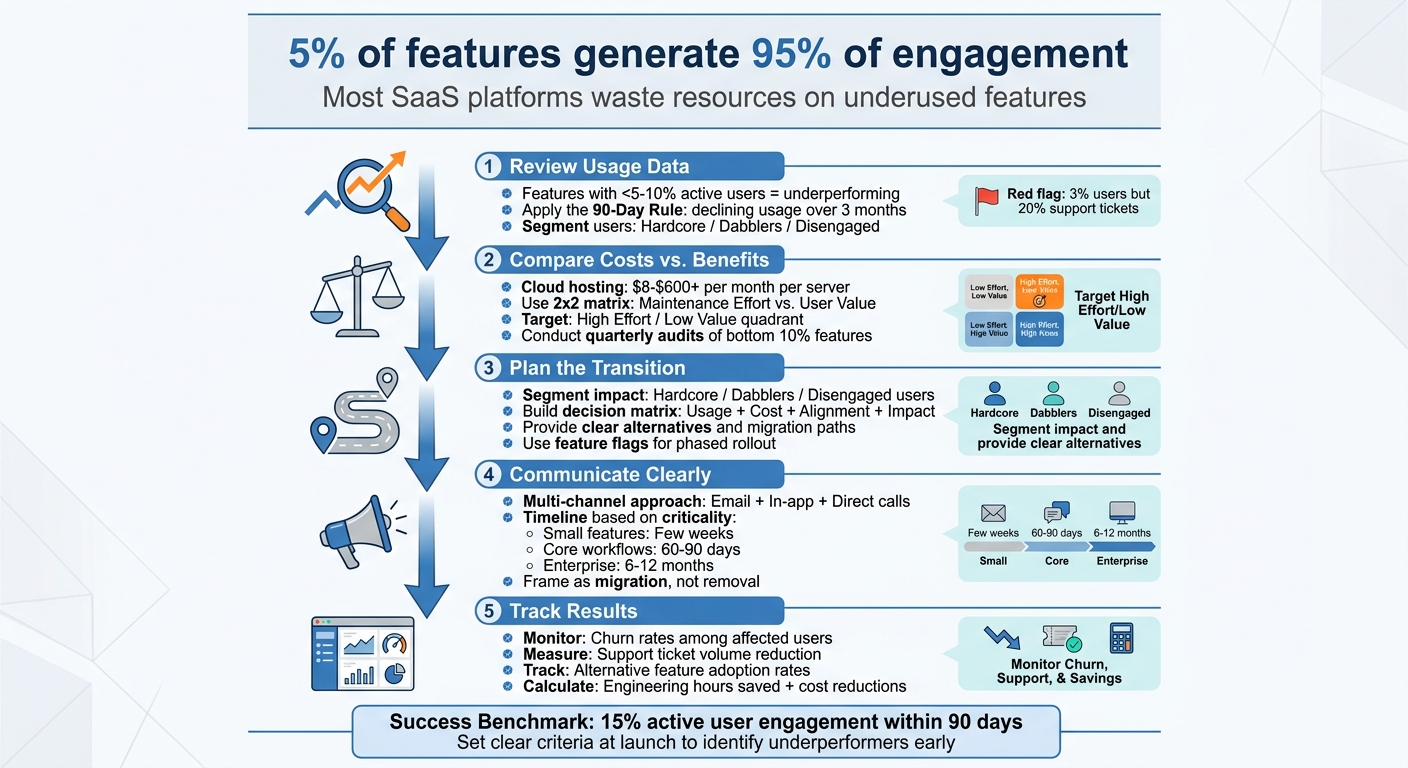 :::
:::
Strategic Product Sunsetting: When & How to Phase Out Features
::: @iframe https://www.youtube.com/embed/IDlpS5gdz7s :::
Step 1: Deciding Which Features to Remove
The toughest part of retiring features isn’t the technical work - it’s figuring out which ones to cut. To make the right call, rely on objective data to identify features that consume resources without adding real value.
Review Usage Data
Start by analyzing how often each feature is used. Features with less than 5% to 10% active user engagement are usually underperforming [8]. Similarly, if a feature is used less than once a month, it’s likely not meeting user needs [7].
Use the 90-Day Rule: if a feature’s usage has been consistently low or declining over three months, it’s a strong candidate for removal [1]. To dig deeper, segment your users into groups like "Hardcore Users", "Dabblers", and "Disengaged." This helps uncover whether a niche group relies on a feature that appears underused overall [4].
Cross-check this data with support tickets. For instance, if only 3% of users rely on a feature but it generates 20% of your support workload, it’s a clear sign of a high-friction, low-value element. Establishing success criteria at launch - like hitting 15% active user adoption within 90 days - can guide decisions to phase out underperforming features [8].
Once you’ve identified usage trends, evaluate the financial impact to confirm which features are holding you back.
Compare Costs Against Benefits
Every feature comes with hidden costs, from hosting to ongoing maintenance. For example, cloud hosting costs can range from $8 to over $600 per month per server [1]. If a feature used by just 1% of users consumes 20% of your engineering team’s time, it’s draining resources that could be better spent elsewhere [7].
A 2x2 matrix can help you visualize this. Plot maintenance effort against user value. Features in the "High Effort / Low Value" quadrant should be retired quickly [6]. Also, think about opportunity costs - are more impactful projects being delayed because your team is tied up maintaining low-value features?
Look for redundancy, too. If a newer solution addresses the same need and over 90% of users have already switched, it’s time to sunset the old version [1]. Conduct quarterly audits of the bottom 10% of features by usage to keep your product streamlined and efficient [8].
This kind of analysis not only highlights inefficiencies but also helps you assess how well features align with your brand and strategy.
Find Features That Don't Fit
Sometimes, the features that need to go aren’t obvious from usage data. They might attract the wrong audience or conflict with your product’s core value proposition. Features like these can dilute your product’s identity and should be reconsidered.
"Every feature makes a promise about what your product is. Features that make the wrong promise dilute your positioning." – Veld Systems [8]
Also, watch for features that clutter your interface, making the product harder to use. Legacy functionality that blocks architectural improvements or slows down the evolution of primary features is another red flag [8]. Before retiring anything, double-check that the feature isn’t required by industry regulations or specific enterprise contracts [7][2].
Step 2: Planning the Transition
Once you've identified the features to remove, the focus shifts to managing the transition. The goal here is to minimize disruptions while maintaining customer confidence. A well-planned transition ensures customers feel supported, not abandoned.
Measure Customer Impact
Start by segmenting your users into three groups: "Hardcore", "Dabblers", and "Disengaged" [4]. This segmentation helps pinpoint which users are most affected and where outreach efforts should be concentrated.
Consider the switching costs - will removing a feature disrupt workflows, break integrations, or require customers to make challenging adjustments? [7] Additionally, assess the business risk by identifying if high-value customers could churn due to the change [7].
"A poorly executed sunset can leave customers very upset. And organizing it and getting buy-in from your go-to-market teams is actually more difficult than a product launch." – Mei Luo, Pendo [3]
By understanding the potential impact and offering clear alternatives, you can reduce frustration and improve the overall experience.
Build a Decision Matrix
After evaluating customer impact, use a structured framework to guide your decisions. A decision matrix helps bring objectivity to what can otherwise feel like a subjective process. Evaluate each feature based on four key factors: usage level, maintenance cost, strategic alignment, and customer impact.
| Option | Usage | Maintenance Cost | Strategic Alignment | Customer Impact |
|---|---|---|---|---|
| Keep | High (>10%) | Low to Moderate | High | High / Critical |
| Deprecate | Low / Declining | Moderate to High | Low | Moderate (Workarounds exist) |
| Sunset | Very Low (<5%) | High / Disproportionate | None / Misaligned | Low / Replaceable |
Features that fall into the "Sunset" category - low usage, high costs, poor alignment, and minimal customer impact - are the best candidates for removal. However, before making final decisions, review legal and contractual obligations. Even rarely used features may need to remain if they fulfill regulatory requirements (like HIPAA) or are tied to specific enterprise agreements [7][2].
Prepare for Customer Concerns
Even features with low usage can lead to customer pushback. To address this, provide clear alternatives and ensure robust support resources are in place. If a newer feature already meets the same need, create migration guides or automated tools to simplify the transition [3][4].
Offer data export options - via CSV, API, or manual request - before disabling the feature [8]. This reassures customers that their investment in the feature isn’t lost.
Develop a comprehensive FAQ document to equip all teams with consistent answers [3][5]. Use feature flags to soft-launch the sunset, gathering feedback before fully retiring the feature [10]. This phased approach allows you to adjust if unexpected issues arise.
Step 3: How to Communicate the Change
With your transition plan ready, the next step is to communicate the change effectively to your customers. How you deliver this message can shape whether customers feel informed or caught off guard. Clear and direct communication is key.
Explain Your Reasoning
Start by sharing a straightforward explanation of why the change is happening, what it involves, and what comes next. Customers deserve clarity without an overly apologetic tone. Present the change as progress rather than a setback. For instance, instead of saying, "We're sorry to announce we're removing Feature X", you could say, "We're retiring Feature X to focus our resources on enhancing Feature Y."
Providing data to back up your decision can make your reasoning more credible. Avoid using visuals of the retiring feature, as this can emphasize the loss. Instead, focus on what lies ahead. To make the message more personal, consider having it come from a named sender, such as a Product Manager, or include a short video to add a human touch.
Use Multiple Communication Channels
Not all customers interact with your product in the same way, so relying on a single communication channel can leave some users in the dark. A multi-channel approach ensures broader reach.
Segment your audience based on their engagement levels. For instance:
-
Daily users might benefit from personalized emails or direct calls.
-
Occasional users could be better reached through in-app messages.
-
Inactive users who haven’t used the feature in months may not need a notification at all, avoiding unnecessary noise.
Here’s a quick breakdown of communication channels and their strengths:
| Channel | Best For | Pros | Cons |
|---|---|---|---|
| Reaching inactive users | High reach; creates a permanent record | Easily ignored; lacks immediate context | |
| In-App Messaging | Active users | High visibility within the product | Misses users not currently active |
| Direct Calls | Enterprise or high-value users | Builds trust through personalized interaction | Time-consuming; not scalable |
| Product Tours | Guiding users through changes | Interactive; supports new workflows | Only works within the product |
Make sure your internal teams - sales, support, and customer success - are prepared with FAQs and a clear timeline. This ensures everyone delivers a consistent message. Additionally, disable new sign-ups for the retiring feature to set appropriate expectations.
Give Customers Time to Adjust
After communicating the change, give customers enough time to adapt. The notice period should align with how critical the feature is to your product. For smaller features, a few weeks might be sufficient. For features central to user workflows, 60 to 90 days is more appropriate. Enterprise-level features may require as much as 6 to 12 months.
For example, in 2020, Intercom retired its "Articles" product and provided a six-month notice period. They also offered migration assistance to help customers transition to their core "Messenger" offering [7]. This extended timeline minimized disruption and ensured a smoother transition.
Make the process easier by providing clear migration paths. Instead of framing it as a removal, present it as a migration. Offer step-by-step guides, walkthroughs for replacement tools, or integrations that fulfill the same needs.
"Sunsetting a feature doesn't have to be cause for mourning. You just need to learn how to offboard devoted users from one feature and onboard them to another." – Chameleon [4]
Consider using feature flags to roll out the change gradually. For instance, you could disable the feature for new accounts while keeping it available for existing users. This phased approach allows you to gather feedback and address any unexpected issues along the way.
Step 4: Executing and Tracking Results
Once you've communicated the change, it's time to put your plan into action. Start by implementing changes gradually. For example, stop new usage first - this means preventing new customers or users who haven’t interacted with the feature from accessing it. This keeps the group affected by the change small and easier to manage [3][7]. After that, consider removing the feature from your main navigation to further limit visibility [7][8].
Use feature flags to manage the rollout. This method allows you to control access for specific user segments, making it possible to remove the feature in stages. If problems arise, you can quickly restore access [9]. For enterprise customers, consider offering extended support to ensure a smoother transition [2][9]. Before rolling out the change, make sure your sales, support, and customer success teams are fully prepared with updated materials and clear messaging [3][6].
Once the plan is in motion, focus on monitoring performance to ensure the transition aligns with your goals.
Track Post-Sunset Metrics
After the feature has been retired, shift your attention to measuring its impact. Keep an eye on churn rates, especially among users who frequently used the discontinued feature [2][8]. Another key indicator is your support ticket volume - retiring a feature effectively should result in fewer "how-to" questions about it [2][6][8].
Additionally, track the adoption of any alternative features or workflows you introduced during the transition [2][3]. On the business side, measure areas like engineering hours saved, application performance gains, and cost reductions from decreased maintenance [2][7]. If data migration was part of the process, check how many users successfully completed the transfer or export [9][3].
Learn and Improve
Use the insights from your metrics to refine your approach for future feature removals. Gather feedback from your sales, support, and customer success teams to understand how the change impacted customer workflows and onboarding [2][3]. Evaluate if the removal helped improve development speed or performance for other core features - this can build confidence for similar decisions down the road [8].
Adjust your framework based on these lessons. For instance, setting success benchmarks - like achieving 15% active user engagement within 90 days - can help you identify underperforming features early [8]. You can also map features on a matrix that compares maintenance effort to user value. This helps you pinpoint high-effort, low-value features that might be candidates for future removal [6].
The goal isn’t just to retire one feature effectively; it’s to create a repeatable system that keeps your product streamlined and your team focused.
"Every line of code you keep in your product is a liability. It is surface area for security vulnerabilities, it is something that has to be regression tested with every release, and it is mental overhead for your support team." – DevPro Journal [6]
Keep tracking metrics like churn, support requests, and performance improvements to fine-tune your sunsetting process for the future.
Conclusion
Sunsetting a feature helps sharpen your product's focus on what truly matters. By removing features that no longer serve users effectively, you free up resources, reduce technical debt, and improve your product's overall performance. Interestingly, in many mature products, only about 5% of features account for 95% of total usage [6].
These principles guide the strategies for moving forward.
Key Takeaways
-
Identify features with consistently low engagement.
-
Use tools like a decision matrix to weigh the cost of maintenance against the feature's value. This helps highlight "zombie features" that quietly drain resources.
-
When announcing changes, be upfront about your reasons, give users time to adapt, and provide clear migration guides.
-
Roll out changes step by step, keeping an eye on churn rates and support requests.
"The products that win long term are not the ones with the most features. They are the ones where every feature earns its place." – Veld Systems [8]
Next Steps
Adopt this sunsetting process as part of your ongoing strategy to keep your SaaS product lean and reliable. Schedule quarterly reviews of the lowest-performing 10% of features, and set clear benchmarks - like 15% active user engagement within 90 days - to catch underperforming features early [8]. This routine will help you maintain a focused product roadmap, keep your team flexible, and continue providing meaningful value to your users.
FAQs
::: faq
What’s the fastest way to tell if a feature is truly “dead” or just niche?
The easiest way to figure out if a feature is truly outdated or just appeals to a small audience is by analyzing its usage and performance. Watch for red flags like:
-
Dropping adoption rates
-
Minimal user engagement
-
High support demands
-
Rising maintenance costs
If the feature doesn’t support your product’s goals anymore and shows these signs, it might be time to retire it. :::
::: faq
How do you sunset a feature when a few high-value customers still rely on it?
When retiring a feature that’s important to high-value customers, it’s crucial to handle the process carefully to avoid damaging trust. Start by communicating the change clearly and well in advance. Explain why the feature is being phased out and how it will impact users.
Offer alternatives or migration paths to help customers transition smoothly. This might include recommending similar features, third-party tools, or providing step-by-step guides.
To ease the shift, consider using phased rollouts or feature flags, which allow customers temporary access to the feature while they adjust to the change. Throughout the process, ensure dedicated support is available to address concerns and provide assistance.
By prioritizing transparency and offering robust support, you can reduce disruption and maintain strong relationships with your customers. :::
::: faq
What’s the safest notice period and rollout plan to avoid churn?
The best way to prevent user churn when retiring a feature is to plan a gradual phase-out and communicate openly from the start. Let users know several weeks - or even months - before the change, depending on how critical the feature is. Use tools like feature flags or staged rollouts to make the transition seamless. During this time, offer support or migration help to ease the process for users. A common timeframe is 3 to 6 months, giving users plenty of time to adjust. :::
Related reading
- Vertical SaaS Pricing: How Niche Markets Change Every Pricing Rule
- B2B SaaS Landing Page Teardowns: 15 High-Converting Examples Analyzed
- Rituals vs. Processes in SaaS Growth
- top 20 brands or products that match these criteria: enterprise service-level agreements for experimentation software.
- Zuora vs Stripe vs Orb (2026): Usage-Based Billing for SaaS
Useful tools & services
Go deeper than any blog post.
The full system behind these articles—frameworks, diagnostics, and playbooks delivered to your inbox.
No spam. Unsubscribe anytime.